There are many apps in the app store in shopify in that some are paid and some are free. You can also develop your custom app with the help of shopify developers.
You Can download some of the marketing app in your store that will give a richer look as well as show popups or do bulk email.
Here we have listed some of the shopify app that will be helpful to increase revenue in your store:
The post Best apps To Increase Revenue In Shopify in 2024 appeared first on Alian Software.
]]>Whatsapp Chat + Abandoned Cart

When a customer visits your website and adds something to the card but doesn’t buy it and leaves the website without buying it is called an abandoned cart so you can see that and chat with them.
As a customer clicks on the WhatsApp chat button they will be able to send you a message so you can talk to them and answer their queries in WhatsApp.
So this will help to solve your customer queries and can convert customers and your sales can be increased.
Spin A Sale

The app displays a special price wheel for your customers that can be fully customizable by spinning the wheel. The customer has to enter their name and email address so you also build a customer database from this.
And then you can send them targeted emails and when they spin the wheel they also get a random discount that is given by you so that the chance of buying also increases.
The app also provides automatic unique coupons so that once used cannot be reused you can set the date and time the coupon is valid for this app is fully responsive and works well with all devices.
Ultimate Sales Boost

The app has many features from home page to checkout page all pages can be covered.
Features :
- Countdown Timer
- Sales Sticker Image
- Buy One Get One
- Get it buy timer
- Free Shipping Message
- Low stock warning
- Payment gateway
- Add to cart button animation
- Reserved timer
- Promotional message on cart page
Optinmonster

You can grow your email list with this targeted popup and you can target them for sales. This is mobile friendly and seo friendly and created in just 5 minutes.
Pushengage

You can also create different types of campaigns with the help of this app like price drop alert or inventory alert campaign. Pushengage allows you to send notifications in customers native language.
Web push notifications work better than email as many people do not open all emails but if they see a notification in their smartphone then the opening ratio will be increased.
Lucky orange

When a user comes to your website and navigates his activities on your website get recorded and after you can easily see that this allows you see where your visitors have clicked, scrolled and tapped.
So with information you can send personalised offers to that customer wherever he is interested so that you can get it converted to a sale.
Constant Contact Email

You can connect your Shopify store with its app in seconds and it will automatically sync your contacts and all your products and then you can send automated emails of offers and products and coupons to abandoned cart emails that recover lost sales.
Plug-in-seo

Plug in seo helps in boosting your store search engine ranking and helps to gain new visitors from search engines. This app has many features like google search console integration, keyword tool and suggestions, seo health check report, detect and fix broken links and 404 pages.
Yotpo

This is a recommended app that many stores use. It helps in collecting reviews, ratings, photos, and videos and turn customer content into sales.
You can send automated email and sms review requests to your customer and you can also make a question and answer section on your store.
Product Reviews

Conclusion
Hiring a company or freelancer is dependent on the type of the project, budget, and timeframe needed for the project development.
On long-term basis, for quick, personalized, proactive and cost-efficient service, hire a development company, and for independent requirements hire a freelancer; as per one’s preference. Even in small projects companies play a vital role by providing quality customizable packages.

The post Best apps To Increase Revenue In Shopify in 2024 appeared first on Alian Software.
]]>Here we have researched some useful tips to increase your sales and boost your revenue:
The post Actionable Tips To Increase Revenue In Shopify appeared first on Alian Software.
]]>Reducing Bounce Rate

You can check the Shopify analytics to see your site bounce rate or for more accurate information, you can integrate a third party like google analytics.
To reduce the bounce are you need to follow some tips from designing to the speed of the website so that you can make your customer stay longer.
The First Fold(screen) of your website should be attractive and the other sections of your website should be eye-catching and contain various product information.
- Make the website mobile friendly
- Use engaging content
- Optimize site speed
- Kown the targeted audience
- Make Your brand authorities
- Don’t Use many popups
- Make navigation easy
Use Featured Collections

In feature collections, you can highlight the products that you want to show so that that product can grab customer attention first.
You can also use the product slider here it will automatically slide the products so that it will look more professional.
You can also put a direct checkout option here so that if the customer is interested he can directly purchase the product from here.
Use Content Marketing To Attract Customers

More Informative Content can help your site to rank higher on google and get traffic from there and it will also help you to build a brand.
You can also provide a faq section to solve customer doubts and also you can write some posts to compare two or more products.
Make Navigation Well Categorized

This is a most important strategy to generate more revenue when a visitor lands on your website and wants to find a product then he will have to navigate through different menus of your website.
So here you need to maintain a proper menu like you can create a category and then other subcategories inside that so it is easy to navigate.
Build Email List For Marketing

An email list does not seem to be important on the surface but with the email list, you are building something that gives you value far into the future.
It allows you to send multiple invitations to people asking them to visit your e-commerce store.
If you will directly show a popup on when website then it be irritating for the customer and there will be less chance that the customer will enter the email.
So instead of that, you can simply give some offer to the customer for on entering the email so the chances of entering the email will be increased.
Give Quick Checkout Option

Creating a direct checkout link will give convenience to your customers where customers can buy a product directly instead of going to the product page and the cart page.
In Case you have variations you can give a checkout box option on the product listing page so that the customers can select the product variation and can directly checkout.
Giving quick checkout option can help you in many ways like when a customer has come with a perfect mindset of buying a specific product then he can quickly get the product and can easily checkout.
- You can give a discount of 5% on a product when a customer registers the email.
- Offer an incentive for your list
- Add conversion-focused opt-in forms
- Create a landing page
Show Customer Reviews to increase trust

Trust is a most important thing of a business so it is very important for customer reviews on every product so the new buyer can trust your site.
You can put some customer ratings and reviews at the end of the product page so that buyers can get an idea about the product.
Collect Reviews shows that your business values the people and their valuable feedback.
Show Trust Badge

You can add a trust badge on your eCommerce store so that customers can get trust in the store. For example, at the checkout, you can add a 100% secure checkout badge so that while making the payment customers will feel safe.
These are some of the examples of badges you can put on your e-commerce store so that customers can trust you easily.
Create An Instagram Shop
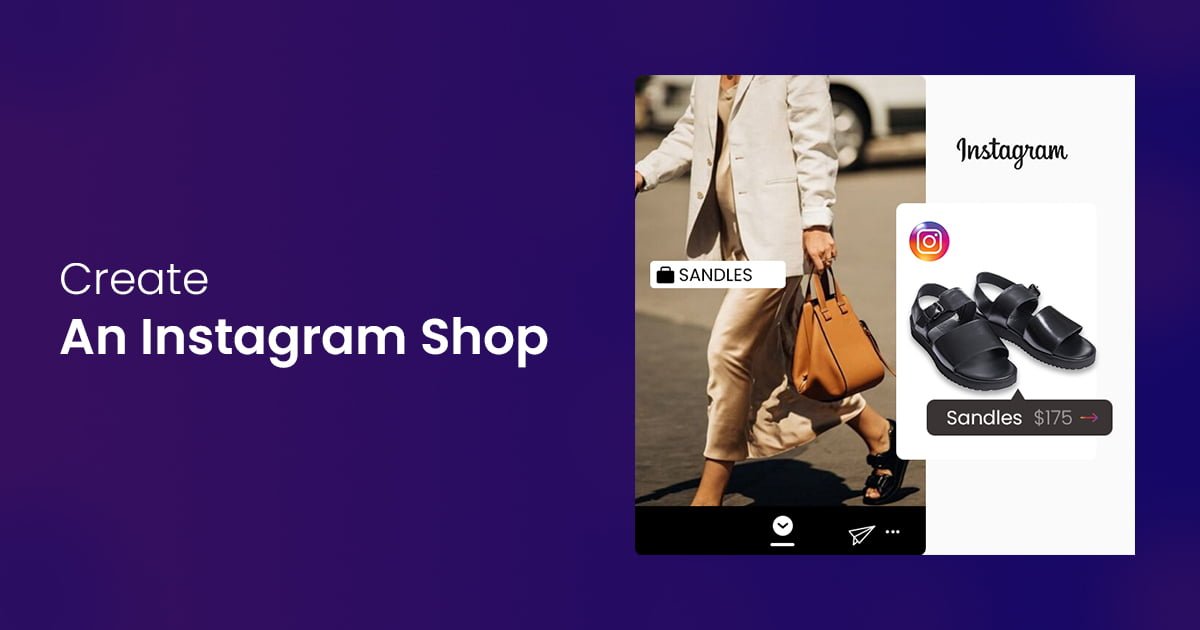
Instagram allows you to turn your posts into shoppable posts allowing the audience to buy directly from there.
There are many advantages of an Instagram shop
- Products are easily discovered
- Quicker buying
- B2C Marketing
Use Up-Sell and Cross-Sell Techniques

Upselling is a strategy to sell a superior or more expensive product from the product which the customer is already buying.
There is also another selling strategy as bundling in which you bundle together the main product and other auxiliary products for a higher price than what the single product is sold.
Identify Customer’s Problem Using Abandoned Cart

Apart from doing emails, you can Contact them on WhatsApp. It is the best option because many people use it frequently so you can just connect with them and solve their doubts.
Use Interakt app to send messages directly to customers through WhatsApp.
Conclusion
Hiring a company or freelancer is dependent on the type of the project, budget, and timeframe needed for the project development.
On long-term basis, for quick, personalized, proactive and cost-efficient service, hire a development company, and for independent requirements hire a freelancer; as per one’s preference. Even in small projects companies play a vital role by providing quality customizable packages.
The post Actionable Tips To Increase Revenue In Shopify appeared first on Alian Software.
]]>The post Which is the best platform to build your eCommerce business online? appeared first on Alian Software.
]]>Key Points to keep in mind while choosing an eCommerce platform
While planning for a ecommerce store there are many points you should look across some of that are as follows:
- Security – Safety of your ecommerce store from frauds and attacks.
- Speed – Your Websites loading speed.
- Plans – Price you have to pay for starting your ecommerce store.
- Your Budget – The Amount to have to start your ecommerce store.
- Easy User Interface – How the website will be presented to the customer.
- Seo – To rank your websites on various search engines.
Now Lets see a detailed comparison on both the ecommerce platform so that you can easily justify the best platform according to your needs :
Business Needs

For example if your business is only local and does not sell anything beyond your district you do not require much features like multi language or multicurrency. And if you don’t have many visitors on your website you can go with a lower plans platform.
And if you want to make ecommerce stores that work globally outside the country you will have to choose a platform which has features like making multi language and multi currency and high end servers for international traffic.
Requirements – So depending how your business is you can choose a platform that gives the perfect tools you require at an affordable price range for example if your business is new and the store doesn’t have many visitors you can go with lower plans and you can upgrade wherever required.
Technical – Talking about technical qualifications when you have to customize shopify you will require a shopify developer which is hard to get and shopify is also costly whereas in woocommerce you can also customize on their own or can hire wordpress developers which are easy to get and not too costly.
Product – If your product has variations like if you are selling a tshirt and your customer can pick a color for that then you have to develop that which is easier in woocommerce but hard in shopify.
If you have any issue in using this platform you can contact us here
Scalability

So talking about shopify it has its own servers for hosting you website which means you never have to worry about performance when you feel that your business is growing you can always just simply upgrade the plan and short the issue.
Whereas in woocommerce you will have to manually take backups for your website and maintain security of your website.
If your website traffic increases you will have to upgrade your wordpress hosting plan to handle that.
In Woocommerce you can make sure that you are not paying for the resources you need but most of the shop owners prefer hassle free solutions that is shopify.
In shopify when your store is growing you need to install more apps and at that time if you plan is lower you will have to upgrade your site to plus plan which is again costly so again woocommerce is a better option.
In shopify you need a developer to maintain and shopify developers are hard to get but in woocommerce when your store is growing you can easily get developers or if you have an IT team you can easily upgrade.
Payment Methods

Shopify offers many payment methods during checkout. Shopify has its own payment solution named shopify payments which is powered by stripe.
You Can also always integrate third party payment gateway which is best according to you but you take payment for third party payment gateways shopify charges 2% fees on every transaction. When you upgrade to an advanced shopify plan your charge is 0.5% it costs $299 per month.
Whereas woocommerce offers paypal and stripe payments by default. The best thing is woocommerce also supports regional and less popular payment services.
If you have your own merchant account and using a third party gateway then you will save a lot of money by using WooCommerce.
Multi Language Setup

Multi language setup is very useful if your store needs multiple languages and it is very useful for the customers as they can see their product in their own language so they can understand it better.
Shopify
Setting a Multi languages store in shopify is easy and you can setup multi language store in shopify with the help of a Shopify apps. There are also free as well as paid apps and every app are very easy to use.
Some of the famous apps are :
- Multilingual Shop – Free
- Weglot Translate – Free to install
- Easy language translate – 7 day free trial
- Conveythis – Free to install
WooCommerce
Setting multiple languages in woocommerce is also very easy and same like shopify in woocommerce. You can easily install plugins and convert your store in multiple languages. But in woocommerce there is an advantage of after setting up your store in multi languages you easily do search engine optimization for your different stores.
Some of the famous multi languages plugins are :
- Wpml – Free
- Translate Press – Paid
- Woocommerce Multilingual – Free
- Polylang – Free
- Weglot – 10 days free trial
In woocommerce there is also a wordpress plugin like wordpress multisite this plugin allows user to run multiple sites under a single installation. It means under a single wordpress dashboard you can run a network of sites. The network sites point to different countries ip form where the user has opened.
For example.- If a user for russia opens your website then he will be automatically redirected to the russian version of your store.
Multi Currency Setup

Shopify
There are many ways to setup multi currency in shopify and it mainly depends upon your plan so if you have a shopify plan then you have to buy the plan for as many times as you want the store so in simple language you have to buy one store for each currency which may be costly.
Only when you have a shopify plus plan then you can easily setup single store multi currency plan that also starts around $2000 per month + 2.15% per transaction.
So if you have a plus plan then only you can create a single store for multi currency but if you have the lower plan then you have to buy a separate store for each currency setup.
Woocommerce
Woocommerce has a very easy solution of multi currency setup with the help of a plugin you can easily setup unlike any currency converter widget it uses converted price during checkout so at the time paying customer can pay according to their choice.
You have to make sure that your payment gateway you used is configured to accept payments in all those currencies.
Some Multi currencies switcher for woocommerce are :
- Yay Currency
- Currency Converter Widget
- Price based on country for woocommerce
WordPress’ multisite feature is useful here as well when you have to make a multi currency site so for example. If you accept payment in INR as well as USD then if a customer from India opens your site then he will get the INR version and if a person form USA visits your site then he will get the USD version.
So here woocommerce is a good option rather than shopify because in shopify you have to buy shopify multiple times and if you go for plus plan then it is $2000 so this will be very costly then wordpress.
Blog

But when coming to woocommerce it is based on wordpress and wordpress is a dedicated blogging platform which is very good and easy to use. So WordPress will be much better for writing blogs rather than shopify.
SEO

In shopify it does all the things that are required for doing seo and you need to do for ranking a site but the wordpress has also a good catch over seo with its plugin like rankmath and yoast seo you can get very quick boost both the plugins have free and paid version.
Pricing

It gives you 14 days free trial so you can try shopify and purchase after.
Shopify has Five plans
- Basic Shopify: $29/ Month
- Shopify: $79/ Month
- Advanced Shopify: $299/Month
- Shopify Lite: $9/Month
- Shopify Plus: $2000/Month
Each shopify plans include SSL certificate and web hosting but it will come with a shopify branded domain name for ex. https://your-store.myshopify.com.
If you want your own domain name you have to purchase that separately and normally a .com domain costs $14 per year.
This pricing does not include third party tools or add ons when you want to add that you have to purchase that with the respected price.
When payments are made shopify has their own payment solution which costs 2.9% + 30 cents per transaction in basic plan and if you use third party payment gateways or your own merchant account then it will charge flat 2.0% for all transactions if you have shopify advanced plan than the charge will be 0.5% flat.
When we come to woocommerce this is a plugin designed for wordpress and it is initially free and a open source plugin.
To make it you will need a domain name ( your brand name registered on internet ) which costs $14.99 per year and ssl certificate and a web hosting.
Serval web hosting companies have low plans so you can purchase that if you have low visitors to your website.
Woocommerce doesn’t have any charge on transactions; its costs will start w
When you will need to purchase paid plugins and paid extensions. It also has many free plugins to use and you will always have alternatives to every paid plugins.
Speed

When talking about shopify it has its own hosting servers included with its all hosting plans and it is capable of handling a good amount of visitors and if you have more visitors you can always upgrade the plan accordingly.
In woocommerce it depends on you to choose a hosting server so you can choose normal shared hosting to dedicated servers according to your website visitors.
In shopify Speed is great because it has its own servers and it comes with every plan so you will not have to worry but in woocommerce it depends on the hosting servers which you have purchased.
Security

SSL is a secure socket layer it is a safe guard shows to the customers that your website is secure and safe.
Shopify has its own ssl and it comes with all plans where as in woocommerce it doesn’t have its own ssl you can install with your hosting provider.
PCI-DSS is a payment card industry data security it means that your website is set up to accept credit card payments with legal regulations.
Checkout page
Support

Woocoomerce doesn’t have any support feature via call, email or live chat so if you have any questions you can always refer to the woocommerce docs blog and faq section where you can find the answer to your question.
While in shopify it has a very good customer service and it supports 24/7 over phone, email and live chat and same as woocommerce shopify also has faq section and shopify forum as well.
So, shopify has much better customer service compared to woocommerce so you will never get stuck in shopify in woocommerce you need to have some of the technical skills to solve your query.
Conclusion
Hiring a company or freelancer is dependent on the type of the project, budget, and timeframe needed for the project development.
On long-term basis, for quick, personalized, proactive and cost-efficient service, hire a development company, and for independent requirements hire a freelancer; as per one’s preference. Even in small projects companies play a vital role by providing quality customizable packages.
The post Which is the best platform to build your eCommerce business online? appeared first on Alian Software.
]]>The post How much does it cost to hire a Shopify developer? appeared first on Alian Software.
]]>Introduction
How to Hire a Shopify Developer
How to Hire a Shopify Developer
Hiring Strategies
1. From Where to Hire?

2. Ask for Recommendation

3. Don’t Run behind the Cheapest

4. Finalize Whom to Hire

The shortlisted individuals need to be interviewed to get the idea of ease of communication with them. The easy conversation is necessary as it is useful while explaining the elements in the project. The After-sale service is another factor that needs to be considered while choosing the freelancer. Sometimes, individual freelancers devote their time to more paying projects and delays the less paying project. It is the drawback in hiring the individual. While to eliminate this risk, if you hire outsourcing company for a project, but it will not be cost effective.
Cost to Hire a Shopify Developer Expert
This quote sums the hiring strategy with factoring the cost of hiring the shopify expert. This is not only applicable to hiring shopify experts, but it is applicable to almost every hiring decision in regard to the freelancing or outsourcing the work.
The average cost of hiring Shopify developers on Upwork (https://www.upwork.com/hire/shopify-developers/cost/) is $15 to $29 per hour. However, cost varies on factors like location, complexity of the work, experience and expertise of the freelancers. Hiring any shopify developer at beginner level on Upwork may cost you as much as $15 per hour. While hiring an Expert shopify developer on Upwork may cost you $95 per hour or more. Highly skilled and expert developers come at a greater price.
According to codementor.io (https://www.codementor.io/freelance-rates/web-developers)
A survey conducted by clockify.me (https://clockify.me/average-hourly-rates) has revealed that in 2020 Web developers in IT sector has earned $23 per hour on average. The survey included 7,000 freelancers, the average hourly rate in $6 to $10 per hour. And most of the freelancers fall under this category. And only 4% of the freelancers charge about more than a $100 per hour. The top 4% of freelancers always remains in demand from the clients.
Conclusion
It is advisable to spend hours in choosing a right expert developer which matches to your need and then start the work, instead of choosing one in hurry and then wasting time in meaningless conversations and correcting errors. You need to establish the objective of the work you want and then start searching the potential freelance web developing expert or an outsourcing expert. Shortlist the skilled and qualified professionals which suits to cater your needs. Check reviews and recommendations from the previous clients and also check the ecommerce website portfolios. Check their features and creativity added by the developer. It tells you about how much expertise the particular developer possesses. However, cost shall not overcast the skillset & qualification of a shopify developer.
The post How much does it cost to hire a Shopify developer? appeared first on Alian Software.
]]>The post Quick Guide: What is Google Analytics & Search Console appeared first on Alian Software.
]]>What is Google Analytics?
There are many other tools that can help you collect and measure your website data. Further divided into two types say free analytics tools and paid analytics tools which could be easily differentiated on the basis of support, features, and functionality. Here is a list of tools that can help in collecting data.
- On the top is Google Analytics & Google Analytics 360 (which is paid) by Google Marketing Platform.
- Kissmetrics by the brilliant SEO expert Neil Patel.
- Adobe Analytics by Adobe.io and more.
Earlier discussed was the free version of Google Analytics also known as GA. The paid version is Google Analytics 360 which is mainly used by websites that earn traffic and visitors in millions. But for websites that receive limited visitors can use GA’s free version which is suitable & perfectly fine.
Why Google Analytics? Reasons to use Google Analytics

How Do Users Find Your Website?
There are billions of websites on Google competing with each other. In this competitive world, business personals want themselves to be found by their target audience and grab their attention to the website.
Google Analytics plays an important role here and a different section is created for this purpose called Acquisition dedicated to providing useful information on how they found your business. There are different channels through which a user lands on the website namely:
i) Paid Ads i.e., Google Ads which are paid and displayed on Google Search Results.
ii) Organic i.e., which are unpaid rankings in the SERPs (Search Engine Result Pages)
iii) Direct where visitors already know your business and finds your website.
iv) Social, where users find your website on social media via social media sharing option, and so on.
What People do when they visit your Website?
Here, you will understand the Google Analytics Goal Flow section where a track of your visitors is kept. How a user interacts with your website and where he ends the interaction. Whether it is submitting a contact form on your website or purchasing a product/service through your website. Google Analytics shows you all the data. To engage users for a long time, the website should look really nice and should have easy to navigate content.
Popular Pages of your Website
Google Analytics helps you identify the most visited pages on your website. Either it is your website’s blog page or your product/service pages, GA shows the most visited pages. Based on demographics & geography, and their general interests online.
Conversion Tracking
A conversion is an action or a group of actions taken by the user on a website or mobile application. Conversion tracking is different from website to website and business. You can set up tracking conversions based on actions you most want visitors to take, such as submitting a form, users emailing through the website, newsletter signup, downloading an ebook, and so on.
It’s Easy & Free
This tool is really easy to navigate and user friendly. Anyone with basic knowledge of GA can easily set up a Google Analytics account for their website. Moreover, this tool is FREE. Business owners with a limited budget can go with this tool and collect all the website data and analyze the business situation and improve accordingly.
What is Google Search Console?
Why Google Search Console? Reasons to use Google Search Console

Improves Search Engine Visibility
Worried about your website search engine visibility? Google Search Console will help you know if your website is struggling with the search engines or you are online and able to reach your users.
Attract Traffic with Optimised Keywords
GSC opens a new window for optimized keywords that people frequently use to access your website. This will help you shape a better user experience and boost your results.
Track Real-time Website Changes
You can make an endless number of changes to your website and wait for a week or months for Google’s bots to crawl your website. By now you might have an idea why you must use the Search Console for your website.
Makes Website Faster & Responsive
Many times it happens that users abandon your website due to the reason of slow website loading or any other glitch. GSC allows you to take remedial steps and approve changes to become mobile-friendly.
Conclusion
To make the SEO strategy work you will need both Google Analytics and Google Search Console. When you fire this double-barreled gun you can easily aim for higher search engine rankings and boost traffic to your site, and convert traffic into customers.
These are free tools that can easily help you achieve your SEO goals. There are hefty tools that can help you but GA & GSC promises to deliver higher than expected results and that too without paying a single penny. Small businesses or startups should go with these tools to track their results. Still confused and want to set up Google Analytics & Google Search Console accounts for your website? Contact us at sales@aliansoftware.net and we will set it up for you.
The post Quick Guide: What is Google Analytics & Search Console appeared first on Alian Software.
]]>Choosing an eCommerce store is a big decision. Your website represents your entire eCommerce business, and choosing the right platform for your business is as important as drinking water. We all know that Shopify is the best platform for eCommerce development services so far but have you heard about its upgraded version? Have any developers mentioned Shopify Plus while you were discussing with them about Shopify’s default checkout?
The post Shopify Plus: Features that Boost Business appeared first on Alian Software.
]]>
Why Should Big Businesses use it? Features and Benefits:
Easy for Non-technical users:
- It is not easy to run big businesses with ease of use, right? But it’s not like that with Shopify Plus, it comes with a very easy to use interface which non-technical users can access easily.
- Along with that, you also get access to the Shopify Plus Academy through which you can easily get training on some of the main topics through which you can grow your business, so it makes the Shopify Plus even easier.
Visually Appealing Designs of themes:
- With Shopify plus you get access to hundreds of premium themes that you can use to develop your brand new website.
- Whether you want to create a store for your apparel brand or you want to sell your art, either you want to digitize your boutique or you want to make the collection of your jewelry available for customers to buy, Shopify Plus has all types of eCommerce solutions for your offerings.
- Shopify Plus also allows a high degree of customization by giving you access to Shopify’s Liquid file which is used to build the themes.
Access to Advanced Shopify Apps:
- The Shopify Plus Certified App Program is for best-in-class technology solutions chosen for their quality with Plus merchant needs.
- With Shopify Plus you get access to various advanced Shopify apps like Findify, Kustomer, Zaius, Sellbrite, Shippo, and much more…
Access to checkout.liquid file:
- You must be aware that Shopify comes with its default checkout which we can not change so here comes the big advantage of the Shopify Plus Partner plan, here we can customize check out the way we want it to be.
- The checkout page is one of the most important parts of your eCommerce store as it’s the last step of converting a user to a customer and an easy checkout can definitely improve the conversion rate of the store.
- By getting access to checkout.liquid file, you also get features like a better checkout interface, easy CRM integration, one-page checkout, Custom Messages in Checkout for Certain Products, and much more…
Extensive Customization:
- Many basic platforms aren’t that good for store customization as not every platform allows many customizations on the theme you initially installed.
- But with Shopify Plus, it’s not like that. It gives you the capability of Full store customization through editable CSS files and scripts.
- With Shopify Plus one can also create fully automated workflows which can also result in cutting hours of repetitive work from daily tasks.
- We can use Shopify Plus flow to put things like Identifying and canceling high-risk orders, Hiding out of stock products from online inventory, Re-ordering inventory when a certain threshold is hit, and much more.
Merchant Success Program (Customer Support):
- Customer service is one of the essential parts of a successful platform and that’s where Shopify Plus excels.
- With Shopify Plus, you’ll get a dedicated success manager who is there to help you 24/7.
- They are not there just for answering queries but they actually help you with anything that may be related to design modifications, assistance with store setup, custom integrations, SEO, and they will also help you to reach your business goals.
What is its future in 2021?
There are thousands of people who are using Shopify for many years for eCommerce purposes and have developed their business in these many years.
Most of them are more likely to upgrade their plan to Shopify Plus because of its amazing features and capabilities that help large businesses to grow.
You can predict that the market of Shopify plus users will go up in 2021 as Shopify is the kind of platform through which it is next to impossible to generate no revenue.
Shopify is growing rapidly with a growth rate of around 29% per year and it will continue growing like this for this upcoming year.
Conclusion
Shopify Plus is a powerful platform that can accelerate a brand’s growing rapidly.
But it comes with a price. And it’s essential to only invest once you’ve reached that point in your growth that makes the expense worth it.
Do you consider utilizing the Shopify Plus features for your business? Feel free to contact us today at sales@aliansoftware.net.
We at Alian Software are official Shopify partners and have been working with hundreds of Shopify stores to date.
We provide end to end solutions for any kind of Shopify related requirement from logo designing to final delivery. So, please reach out to us to avail of Shopify development services for your eCommerce business. We are more than happy to help you.
The post Shopify Plus: Features that Boost Business appeared first on Alian Software.
]]>Our Shopify experts offer the top-level expertise with years of rich hands-on experience of working on various classic eCommerce store projects on Shopify. We help people with business to make their online presence more effective. Shopify experts at Alian Software are enriched with years of experience in designing and developing eCommerce stores from scratch. Which developed higher the work excellence and utmost client & end-user satisfaction with us.
The post Shopify Development Agency appeared first on Alian Software.
]]>What do We do?

Start your Shopify store for free today with 14 days of the free trial. Click Here to get your free trial.
Hire our experts to achieve your success
Starting from Scratch
Hire our expertise to achieve satisfying results and give the end-user a delightful experience. See our previous projects & feedbacks from satisfied clients.
Redesign / Rebuild the Shopify Store
If you are already subscribed to Shopify & not getting the expected results, you are required to redesign your Shopify store. We have previously redesigned numerous Shopify stores and enhanced the end result in a better revenue-generating Shopify store. Click Here to see one of the best projects where we helped our client to increase the revenue by many folds.
Customizatione
Not getting the design of your choice? Then we build it for you. Just give us a sense of your inspiration, and our expert designers will design the best of your expectations. Click here to see our previous customization work.
Create Mobile Applications
Mobile applications provide the best revenue-generating results in eCommerce stores. Hire our experts to get the breakthrough results on mobile platforms. Reach to your suitable audience through special campaigns. We have an expert team to help to design & develop an agile mobile application for your Shopify store.
How to Hire Our Shopify Development Agency?
Conclusion
Hiring a company or freelancer is dependent on the type of the project, budget, and timeframe needed for the project development.
On long-term basis, for quick, personalized, proactive and cost-efficient service, hire a development company, and for independent requirements hire a freelancer; as per one’s preference. Even in small projects companies play a vital role by providing quality customizable packages.
The post Shopify Development Agency appeared first on Alian Software.
]]>The post How to Revive Business on Shopify due to COVID 19? appeared first on Alian Software.
]]>Get on-board the Shopify
Hire Shopify Experts
Paperboard:
An outstanding, cost-effective, and customer-friendly option for packaging for different products. Paperboard is very flexible and well-matched with many printing factors.
Corrugated:
generally use it for the study materials.
Rigid:
Use for premium and luxury products
Display:
Which will help you to highlight your product in the best way.
Label/Sticker:
Generally use for the liquid product, beauty product, and so on…
Inner Packaging Label Design on the Bottle & Outer Packaging Design.
Who will use this product?
This question will help you to create a unique design for your product. The main focus is on the 4 categories mentioned below:
Location:
Now you may have the question that how the location affects your packaging. So let’s take one example if we select some religious place and we design according to the shopping mall then it won’t work. It needs to be pretty simple so people can buy for religious purposes.
Age Group:
We can take the example of a toy package design for children. So if we design it with light color and pretty simple then it won’t work here as it’s toy package we need to make it attractive with fast colors.
Gender:
Here we need to take care of the shapes and color of your package. If the products are to be designed for female we can select colors like white, pink, blue, etc. With the nice shapes of the package, you can attract your female audiences. But if we are designing products for the male, then it should be with colors like black, gray as boys like that type of color.
Lifestyle:
Here we need to think about “ where we are going to sell our product” if you are designing the package for one of the clients from the USA, then you need to design according to their current trends in the USA. If you design it according to Indian trends, then that will not work. As the Indian and the American lifestyle is totally different from each other.
Local Delivery
Free E-mail marketing on Shopify
New Marketing Strategy
Stay in Touch with Shopify Community
Conclusion
Hiring a company or freelancer is dependent on the type of the project, budget, and timeframe needed for the project development.
On long-term basis, for quick, personalized, proactive and cost-efficient service, hire a development company, and for independent requirements hire a freelancer; as per one’s preference. Even in small projects companies play a vital role by providing quality customizable packages.
The post How to Revive Business on Shopify due to COVID 19? appeared first on Alian Software.
]]>The post How to hire Freelance Web Developer? appeared first on Alian Software.
]]>How to Hire a Freelance Web Developer?
The most difficult task while hiring a freelance Web Developer is to evaluate the skills and ability of the freelancer. Web Developers covers the various expects of Web development and is a crucial part of making a functional website. Before hiring freelance Web Developers, you need to evaluate the freelancer on the following criteria.
How to Hire a Freelance Web Developer?
- He/she must have worked on the markup languages like HTML5, CSS3, JavaScript, etc.
- A Web Developer must have worked on Back-End Technologies like PHP, Python, Java, etc.
- Must have knowledge of database structure, libraries & frameworks
- Freelancer should have a working knowledge of Code-Versioning tools like GitHub, BitBucket, etc.
- Must know the debugging process
- Should have a working knowledge of Visual Studio, Sublime Text, Atom, etc.
How to evaluate experience?
What questions should l ask?
Further, one to one conversation is very much recommended. It will help you out to evaluate the level of communication & level of understanding of the freelance web developer. It will reduce your efforts & time to the lengthy process of explaining the project in detail. While evaluating, you may go through web developer’s previous projects and ask the complexity related questions like:
- How much time did he/she take to complete the particular project?
- What complexity he/she faces while completing the job?
- What are the technical strength and weakness he/she have?
This type of few questions will give you enough insight into the skills & knowledge of the freelancer Web Developer. If he/she falls into your criteria, you may go ahead with hiring that freelancer web developer.
You can also get the word-class output while working with our multi-talented Web Developers. Hire our Web developers now!
Conclusion
Hiring a company or freelancer is dependent on the type of the project, budget, and timeframe needed for the project development.
On long-term basis, for quick, personalized, proactive and cost-efficient service, hire a development company, and for independent requirements hire a freelancer; as per one’s preference. Even in small projects companies play a vital role by providing quality customizable packages.
The post How to hire Freelance Web Developer? appeared first on Alian Software.
]]>The post Magento 2 vs Shopify Plus – 10 Points of Comparison appeared first on Alian Software.
]]>Users & Popularity
Technology
Both the platforms are different in technology. Shopify plus is cloud based SaaS (Software as a Service), where Magento commerce is PaaS (Platform as a Service). Shopify plus provides a fully hosted system, where the Magento provides a self-hosted platform. However, shopify plus offers you free security & version upgrades where Magento platform needs a developer & maintenance would cost you externally.
User control
B2B & B2C (Multi-store)
Customisation
To customize any Shopify ecommerce website, you need to have the knowledge of Shopify liquid coding. Shopify doesn’t offer you the multi-currency payment option. It is possible with the Magento ecommerce only.
Cost
To customise any Shopify ecommerce website, you need to have the knowledge of Shopify liquid coding. Shopify doesn’t offer you the multi-currency payment option. It is possible with the Magento ecommerce only.
Multi- Language Coverage
Any ecommerce store that covers the large number of population across the continents which makes it necessary to have a store that support multiple languages then you need to opt for Magento commerce. In case of Shopify plus, it is possible to have a multiple language store but it is very rarely seen. You can add apps to the Shopify store for multiple languages and their translations.
Product
There is a limitation in shopify plus that it doesn’t allow you to add more than 100 product variant, where Magento eCommerce platform allows infinite number of product variant to your platform.
Platform Upgradation
Third-Party Solutions
Conclusion
Comparing both the ecommerce platform, it seems like both the platform offers unique features in their own. If you are a premium ecommerce store and asks more qualitative technical support, the Shopify Plus is made for you. If you like something made of your own taste, with customization you like then Magento is the option for you.
Click here to Read More on How to start Shopify Drop-shipping?
FAQs
How to create ecommerce website in magento 2?
Is shopify plus worth it?
How much does Magento 2 cost?
How much does shopify plus cost?
What is the difference between shopify and shopify plus?
The post Magento 2 vs Shopify Plus – 10 Points of Comparison appeared first on Alian Software.
]]>