Deprecated: Return type of Ai1wm_Recursive_Directory_Iterator::hasChildren($allow_links = true) should either be compatible with RecursiveDirectoryIterator::hasChildren(bool $allowLinks = false): bool, or the #[\ReturnTypeWillChange] attribute should be used to temporarily suppress the notice in /home/stagingaliansoft/public_html/wp-content/plugins/all-in-one-wp-migration-unlimited-main/lib/vendor/servmask/iterator/class-ai1wm-recursive-directory-iterator.php on line 57

Deprecated: Return type of Ai1wm_Recursive_Directory_Iterator::rewind() should either be compatible with FilesystemIterator::rewind(): void, or the #[\ReturnTypeWillChange] attribute should be used to temporarily suppress the notice in /home/stagingaliansoft/public_html/wp-content/plugins/all-in-one-wp-migration-unlimited-main/lib/vendor/servmask/iterator/class-ai1wm-recursive-directory-iterator.php on line 35

Deprecated: Return type of Ai1wm_Recursive_Directory_Iterator::next() should either be compatible with DirectoryIterator::next(): void, or the #[\ReturnTypeWillChange] attribute should be used to temporarily suppress the notice in /home/stagingaliansoft/public_html/wp-content/plugins/all-in-one-wp-migration-unlimited-main/lib/vendor/servmask/iterator/class-ai1wm-recursive-directory-iterator.php on line 42

Deprecated: Return type of Ai1wm_Recursive_Extension_Filter::getChildren() should either be compatible with RecursiveFilterIterator::getChildren(): ?RecursiveFilterIterator, or the #[\ReturnTypeWillChange] attribute should be used to temporarily suppress the notice in /home/stagingaliansoft/public_html/wp-content/plugins/all-in-one-wp-migration-unlimited-main/lib/vendor/servmask/filter/class-ai1wm-recursive-extension-filter.php on line 47

Deprecated: Return type of Ai1wm_Recursive_Extension_Filter::accept() should either be compatible with FilterIterator::accept(): bool, or the #[\ReturnTypeWillChange] attribute should be used to temporarily suppress the notice in /home/stagingaliansoft/public_html/wp-content/plugins/all-in-one-wp-migration-unlimited-main/lib/vendor/servmask/filter/class-ai1wm-recursive-extension-filter.php on line 37

Deprecated: Return type of Ai1wm_Recursive_Exclude_Filter::getChildren() should either be compatible with RecursiveFilterIterator::getChildren(): ?RecursiveFilterIterator, or the #[\ReturnTypeWillChange] attribute should be used to temporarily suppress the notice in /home/stagingaliansoft/public_html/wp-content/plugins/all-in-one-wp-migration-unlimited-main/lib/vendor/servmask/filter/class-ai1wm-recursive-exclude-filter.php on line 41

Deprecated: Return type of Ai1wm_Recursive_Exclude_Filter::accept() should either be compatible with FilterIterator::accept(): bool, or the #[\ReturnTypeWillChange] attribute should be used to temporarily suppress the notice in /home/stagingaliansoft/public_html/wp-content/plugins/all-in-one-wp-migration-unlimited-main/lib/vendor/servmask/filter/class-ai1wm-recursive-exclude-filter.php on line 37

Deprecated: Return type of Ai1wm_Recursive_Newline_Filter::accept() should either be compatible with FilterIterator::accept(): bool, or the #[\ReturnTypeWillChange] attribute should be used to temporarily suppress the notice in /home/stagingaliansoft/public_html/wp-content/plugins/all-in-one-wp-migration-unlimited-main/lib/vendor/servmask/filter/class-ai1wm-recursive-newline-filter.php on line 28
Shopify Archive https://staging.aliansoftware.net/category/shopify-archive/ Best Web & Mobile App Development Company Tue, 02 Dec 2025 11:02:37 +0000 en-US hourly 1 https://wordpress.org/?v=6.8.3 https://staging.aliansoftware.net/wp-content/uploads/2022/08/favicon.png Shopify Archive https://staging.aliansoftware.net/category/shopify-archive/ 32 32 How to Build Shopify Custom Apps That Stun the ECommerce World https://staging.aliansoftware.net/shopify-archive/how-to-build-shopify-custom-apps-that-stun-the-ecommerce-world/ Thu, 24 Jul 2025 10:54:20 +0000 https://aliansoftware.com/?p=50368 The e-commerce landscape has transformed dramatically, pushing merchants to seek unique solutions that set them apart.

The post How to Build Shopify Custom Apps That Stun the ECommerce World appeared first on Alian Software.

]]>

The e-commerce landscape has transformed dramatically, pushing merchants to seek unique solutions that set them apart. Generic, one-size-fits-all apps no longer cut it in today’s competitive digital marketplace. Shopify custom apps have emerged as game-changers, offering merchants tailored solutions that address their specific business challenges.

Recent data shows a significant surge in demand for custom e-commerce solutions:

  • 73% of merchants prefer personalized functionality
  • Custom apps see 2.5x higher adoption rates
  • Tailored solutions drive 40% better ROI

The secret to e-commerce success lies in creating distinctive experiences that resonate with both merchants and their customers. Custom Shopify apps deliver this personalization, enabling businesses to implement unique features, automate specific workflows, and create seamless integrations with existing systems.

Ready to dive into the world of custom Shopify development? This guide will walk you through the essential steps to build stunning apps that captivate merchants and elevate their e-commerce operations. From initial concept to final deployment, you’ll learn how to create solutions that truly stand out in the marketplace.

Understanding Shopify App Types

Shopify’s app ecosystem consists of two distinct categories: public apps and custom apps. Each serves unique merchant needs and comes with specific characteristics.

  • Available on Shopify App Store
  • Serve multiple merchants
  • Require OAuth authentication
  • Standard pricing models
  • Regular updates and maintenance
  • Built for individual merchants
  • Direct store integration
  • Simplified authentication process
  • Tailored pricing arrangements
  • Specific feature development

Merchants choose custom apps when they need:

  1. Unique functionality not available in public apps
  2. Integration with proprietary systems
  3. Complete control over data handling
  4. Specialized business logic
  5. Dedicated support and maintenance

Custom apps shine in their ability to address specific business challenges, but they require:

  1. Higher initial investment
  2. Dedicated development resources
  3. Ongoing maintenance responsibility
  4. Direct relationship with developers
  5. Internal technical expertise

The choice between public and custom apps depends on your business complexity, budget constraints, and specific feature requirements. Custom apps offer unmatched flexibility and control, making them ideal for merchants with unique operational needs or specialized workflows.

Validating Your Custom App Idea

Validating your app concept saves time, resources, and potential disappointment. Start your validation process by identifying specific merchant pain points through:

  • Direct Merchant Interviews: Schedule calls with 10-15 potential users
  • Shopify Community Forums: Track recurring issues and feature requests
  • Social Media Groups: Monitor discussions on Facebook, Reddit, LinkedIn
  • Competitor Analysis: Study reviews of similar apps

Create a simple landing page describing your proposed solution. Include a “Register Interest” form to gauge merchant enthusiasm. This approach helps measure genuine market demand without building the actual app.

Key Validation Metrics:

  • Number of merchants expressing interest
  • Specific use cases mentioned during research
  • Price sensitivity indicators
  • Current workarounds merchants use

Consider developing a minimum viable product (MVP) for select merchants. Their real-world
usage provides invaluable insights for refining your app’s features and pricing strategy.
Track these data points in a structured format:

  • Problem severity (1-5 scale)
  • Current solutions used
  • Budget allocation for solutions
  • Must-have vs nice-to-have features

Setting Up the Development Environment

To build powerful Shopify custom apps, you need specific tools to set up your development environment. The Shopify CLI is your main tool for development, making it easy to create and test apps.
  • Shopify CLI for rapid app scaffolding
  • Node.js (version 16.0.0 or higher)
  • Your preferred code editor (VS Code recommended)
  • Git for version control
  • Ruby (required for theme development)
  • Install Shopify CLI through npm: npm install -g @shopify/cli
  • Create your app: shopify app create
  • Set up your development store
  • Configure app credentials in .env file

The workflow for custom apps differs from public apps – you’ll work directly with specific store data rather than implementing OAuth authentication. Your development store acts as a sandbox environment for testing features and functionality

  • Use version control from day one
  • Set up separate development and production environments
  • Implement hot reloading for faster development
  • Keep your dependencies updated
  • Use environment variables for sensitive data

The Shopify CLI handles most configuration automatically, letting you focus on building features that matter to your merchants.

Designing Seamless Integration with the Store

Creating a polished user interface for your Shopify custom app requires strategic use of Shopify Polaris – the official design system that ensures consistency across the platform. Polaris

provides ready-to-use components that match Shopify’s visual language:

  • Pre-built UI elements like buttons, cards, and forms
  • Responsive layout components
  • Accessibility-compliant design patterns
  • Color schemes and typography guidelines

Your custom app’s design should blend naturally with the merchant’s admin interface. Here’s how to achieve this harmony:

Use familiar navigation patterns

  • Mirror Shopify’s menu structure
  • Place key actions where merchants expect them
  • Maintain consistent spacing and alignment

Implement intuitive workflows

  • Break complex tasks into clear steps
  • Display contextual help where needed
  • Provide immediate feedback on user actions

The app’s front-end experience plays a crucial role in merchant adoption. Consider these UX principles:

  • Design for speed and efficiency
  • Minimize clicks required for common tasks
  • Present data in scannable formats
  • Include clear error messages and recovery paths

Remember to test your interface with actual merchants during development to identify pain points and refine the user experience based on real-world usage.

Leveraging Shopify APIs Securely

The Shopify Admin API is your way to access and manage store data in custom apps. Unlike public apps, custom apps use a direct authentication method with permanent access tokens, so there’s no need for OAuth flows.

Here’s how to handle API interactions securely:

  • Store access tokens in environment variables
  • Use HTTPS for all API requests
  • Implement rate limiting in your code
  • Validate input data before sending requests

Common Admin API Operations: javascript // Example: Fetching products const response = await admin.rest.get({ path: ‘products’, query: { limit: 50 } });

The Admin API allows you to make powerful changes to your store:

  • Create or update products automatically
  • Manage inventory levels
  • Handle order fulfillment
  • Process customer data
  • Set up shipping rates

Best Practices for API Security:

  • Rotate access tokens regularly
  • Log all API interactions
  • Set appropriate app scopes
  • Use webhook signatures for verification
  • Handle errors for failed requests

Your custom app can enhance the basic functions of your store by using specific API endpoints wisely. You can build systems for managing inventory, create workflows for processing orders automatically, or develop tools for reporting – all while keeping data handling secure.

Distribution and Installation of Custom Apps

Installing Shopify custom apps differs significantly from public app distribution. You’ll distribute your custom app directly to your client’s store through two primary methods:

  • Generate unique install links from your Partner Dashboard
  • Share the secure link with your merchant client
  • Track installations through the dashboard analytics
  • Monitor app performance metrics in real-time
  • Navigate to the “Develop apps” section in Shopify Admin
  • Create new app credentials within the merchant’s store
  • Configure necessary API access permissions
  • Generate authentication tokens automatically

The installation process maintains strict security protocols while streamlining merchant access. Your custom app appears in the merchant’s admin panel immediately after installation, ready for configuration.

Best Practices for Smooth Installation

  • Prepare clear installation documentation
  • Create a setup checklist for merchants
  • Include configuration guides with screenshots
  • Test the installation process in development stores
  • Set up error handling for failed installations

The direct installation approach eliminates the need for App Store approval processes, allowing rapid deployment and updates for your merchant clients.

Ensuring Security and Compliance

Security is a critical aspect of custom Shopify app development. Your app handles sensitive merchant and customer data, making strong security measures essential.
  • Encrypt data transmission using SSL/TLS protocols
  • Implement secure authentication methods
  • Store sensitive data in encrypted formats
  • Regular security audits and vulnerability assessments
  • Rate limiting to prevent API abuse
  • Clear data collection consent mechanisms
  • Transparent privacy policies
  • Data minimization practices
  • User rights management systems
  • Secure data transfer protocols
  • Follow Shopify’s API versioning requirements
  • Implement proper error handling
  • Use secure webhook endpoints
  • Maintain audit logs for data access
  • Regular updates to security patches

Your custom app must meet Shopify’s Partner Program Requirements, which include maintaining data confidentiality, implementing secure session management, and following best practices for API authentication. These measures protect your merchants’ trust and ensure legal compliance across different jurisdictions.

Remember to document your security measures and maintain clear communication with merchants about data handling practices. Regular security updates keep your app resilient against emerging threats.

Creating Unique Value Through Iteration and Feedback Loop with Merchants

Building a successful custom Shopify app requires constant evolution based on merchant feedback. Here’s how to create an effective feedback loop:
  • Schedule regular check-ins with merchants
  • Conduct user interviews to understand pain points
  • Track feature usage patterns through analytics
  • Monitor support tickets for common issues
  • In-app feedback forms
  • User behavior analytics
  • Beta testing groups
  • Merchant satisfaction surveys

The key to meaningful iterations lies in prioritizing feedback based on:

  • Impact on merchant operations
  • Technical feasibility
  • Alignment with app vision
  • Resource requirements
  • Release updates in small batches
  • Test changes with a select group
  • Document merchant responses
  • Measure performance improvements

Creating value through iteration means staying responsive to merchant needs while maintaining app stability. Each update should address specific pain points identified through merchant feedback, ensuring your custom app remains relevant and effective in solving niche e-commerce challenges.

Continuous Improvement Strategies for Long-Term Success in ECommerce Market

The e-commerce landscape shifts rapidly. Successful Shopify custom apps demand constant evolution to maintain their competitive edge. Here’s how to stay ahead:
  • Monitor emerging technologies like AI, AR, and blockchain
  • Track changes in consumer behavior and shopping patterns
  • Study competitor innovations and feature releases
  • Subscribe to e-commerce newsletters and industry reports
  • Implement automated testing for code quality
  • Adopt microservices architecture for scalability
  • Utilize performance monitoring tools
  • Keep dependencies and libraries updated
  • Create quarterly feature release schedules
  • Prioritize updates based on:
  • Market demand
  • Technical debt
  • Revenue potential
  • Merchant feedback
  • Explore cross-platform integrations
  • Identify potential for API expansions
  • Research emerging market segments
  • Analyze data for untapped functionalities

A robust improvement strategy combines proactive market research with technical excellence. Regular system audits and performance reviews help identify areas for enhancement, ensuring your custom app remains valuable and relevant in the dynamic e-commerce ecosystem.

Conclusion

Building successful Shopify apps requires hard work, technical skills, and a deep understanding of what merchants need. There are endless opportunities in the e-commerce world for developers who want to create innovative solutions that can transform online businesses.
To start creating amazing custom apps, you should:

  • Learn how to use Shopify’s development tools
  • Understand the challenges merchants face
  • Design user experiences that are smooth and intuitive
  • Implement strong security measures
  • Continuously improve your apps based on feedback

The future of e-commerce innovation is in your hands. Use Shopify’s powerful ecosystem to your advantage, connect with merchants, and create custom apps that can completely change the way businesses operate online. Your next custom app might just be the solution that merchants have been waiting for.

The post How to Build Shopify Custom Apps That Stun the ECommerce World appeared first on Alian Software.

]]>
How to hire dedicated Angular developer? https://staging.aliansoftware.net/shopify-archive/hire-dedicated-angular-developer/ Tue, 05 Mar 2024 15:30:54 +0000 https://aliansoftware.com/?p=42448 Hiring a specialized Angular developer may help you realize the full potential of your project, regardless of whether you're starting from scratch or trying to update an old application. However, it might be difficult to discover the correct talent in a talent pool. How can you be confident that the person you're employing has the experience and commitment to realize your vision? In this post, we will share tips to hire dedicated angular developer.

The post How to hire dedicated Angular developer? appeared first on Alian Software.

]]>

How much does it cost to hire dedicated Angular developer?

Why outsource IT services?

The cost of hiring Angular developers varies greatly based on criteria such as their degree of expertise, geographical location, and the complexity of the project. Here’s a summary of the several aspects that might affect the cost:

  • Experience level: Junior Angular developers with less experience are often paid less per hour than senior developers with an established track record of working on complicated projects. Senior developers may charge between $50 and $150 per hour or more, but young angular developers may charge $20 to $50 per hour.
  • Geographic Location: Rates might vary significantly based on the developer’s location. Developers in high-cost locations, such as the USA and Western Europe, typically charge greater prices than developers of an outsourcing company in India.
  • Freelancers vs. Development firms: Because development firms sometimes have greater overhead expenses, hiring individual freelancers may be more cost-effective. Agency advantages may include project management, quality assurance, and continuing assistance.
  • Project Complexity: Hiring developers will be more expensive if your Angular project is complicated. Projects that demand complex features, integrations with third-party services, or unique solutions would most certainly necessitate the hiring of more experienced developers, resulting in greater prices.
  • Project Duration: Whether you hire Angular developers on a short-term contract or for a long-term project might have an impact on the final cost. Long-term contracts may qualify for lower prices from developers.

How do I hire an Angular developer?

To hire dedicated Angular developer, you need to have a methodical strategy to guarantee you hire the best candidate for your project. Here’s a step-by-step tutorial to assist you with the process:
  • Clearly explain the needs for your Angular project. Determine the scope, intended functionality, and budget. Understanding the intricacies of your project will allow you to determine the talents and expertise you need in a developer.
  • Create a detailed job description that covers the tasks, necessary abilities, and credentials for the Angular developer role. Please specify the Angular versions you’re using, any extra frameworks or libraries, and any industry experience necessary.
  • Decide where you will look to hire dedicated Angular developer. There are online employment portals like Indeed and LinkedIn, as well as specialist platforms like Upwork, Toptal, and GitHub Jobs. You may also identify candidates through social media channels, development networks, and local tech meetings.
  • Once you start getting applications, go over the individuals’ portfolios and resumes to evaluate their experience, talents, and past projects. Look for applicants who have worked on projects comparable to yours and have a thorough grasp of Angular best practices.
  • Conduct technical interviews to evaluate candidates’ Angular development ability. Create a series of technical questions and coding tasks to evaluate their problem-solving abilities, understanding of Angular principles, and ability to build clean and efficient code.
  • In addition to technical capabilities, assess applicants’ communication, collaboration, and flexibility. These characteristics are required for effective collaboration with your team as well as adaptation to project needs and changes.

Conclusion

Hire dedicated Angular developer and ensure the success of your web development initiatives. You may identify the best match for your team by using a methodical strategy that involves defining your project needs, drafting specific job descriptions, conducting in-depth interviews, and assessing candidates’ technical and soft abilities. Prioritizing communication, openness, and cooperation during the recruiting process is critical to ensuring a seamless transfer and effective work relationship.

FAQs

What qualifications should I look for in an Angular developer?
Look for candidates with a strong understanding of Angular concepts and best practices, proficiency in JavaScript/TypeScript, experience with HTML/CSS, knowledge of web development frameworks and libraries, and a portfolio demonstrating previous Angular projects.
How do I assess a candidate's technical skills during the interview process?
Conduct technical interviews that include a mix of theoretical questions, coding exercises, and problem-solving challenges related to Angular development. Assess the candidate’s ability to write clean and efficient code, troubleshoot issues, and work through complex problems.
What factors should I consider when determining the hourly rate or salary for an Angular developer?
Factors such as the developer’s experience level, geographical location, project complexity, and duration of the engagement should be taken into account when negotiating rates or salaries. Research market rates and consider the value the developer brings to your project when determining compensation.
Should I hire a freelancer or work with a development agency for my Angular project?
The decision to hire a freelancer or work with a development agency depends on your project requirements, budget, and preferences. Freelancers may offer more flexibility and cost-effectiveness for smaller projects, while agencies can provide additional support, expertise, and project management services for larger, more complex projects.
How can I ensure a smooth onboarding process for the hired Angular developer?
Provide the developer with access to relevant documentation, resources, and tools related to your project. Schedule regular check-ins and meetings to discuss project goals, expectations, and progress. Foster open communication and encourage collaboration between team members to ensure a successful onboarding experience.

The post How to hire dedicated Angular developer? appeared first on Alian Software.

]]>
Cost Guide to Develop a Parking App like Spot Hero https://staging.aliansoftware.net/shopify-archive/cost-guide-to-develop-a-parking-app-like-spot-hero/ Sat, 02 Mar 2024 15:30:38 +0000 https://aliansoftware.com/?p=42219 In crowded cities, parking may frequently seem like a lottery, with cars weaving around the blocks in an attempt to find a place. On the other hand, the procedure of obtaining parking has gotten a lot easier with the introduction of technology. With only a few smartphone clicks, users can now easily identify and book parking spots thanks to apps like Spot Hero, which have completely changed how we view parking. Let’s understand the cost of developing a parking app.

The post Cost Guide to Develop a Parking App like Spot Hero appeared first on Alian Software.

]]>

What are the cost factors in developing a Parking app?

A parking app’s development costs might vary greatly depending on a number of things. The following are some important cost considerations:
  • Features and Functionality: The intricacy and extent of features included in the application will greatly influence the expenses associated with its development. More development time and resources can be needed for more sophisticated features like real-time availability updates, navigation integration, and payment gateways.
  • Platform Compatibility: Development expenses will be impacted by the platform(s) that are selected for the application (e.g., web, iOS, Android). When developing for many platforms, more effort and resources are usually needed than when concentrating on just one.
  • Design and UX: Investing in a user-friendly and aesthetically pleasing app design is essential to drawing in new users and keeping existing ones. The intricacy of the design specifications and the required level of customization will determine the costs related to UI/UX design.
  • Backend Development: It is crucial to construct a strong backend architecture to manage bookings, user authentication, data storage, and connectivity with external APIs. The choice of the technology stack and the necessary level of scalability will determine how much backend development will cost.

Thus, depending on the kind of parking app you are creating, it might cost different amounts. The price range for a simple parking locator app with all the necessary features—such as location-based services, map integration, and access to local parking lots—can be between $30,000 and $55,000.

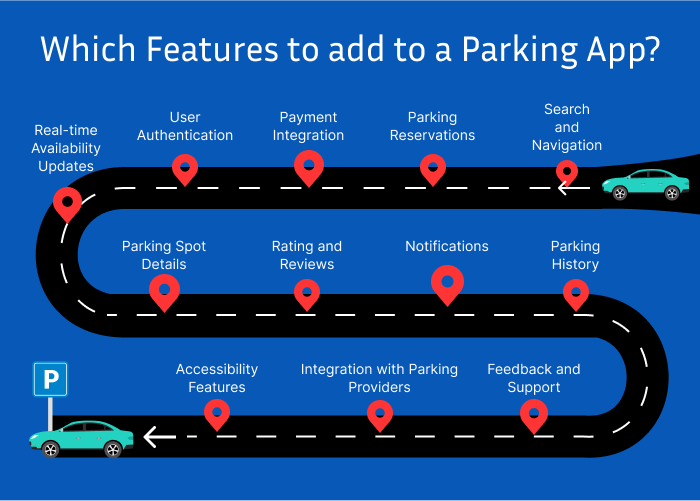
Which features to add to a Parking app like Spot Hero?

Why outsource IT services?

A feature-rich parking software must offer various functions to ensure a smooth user experience. The following are some crucial features to think about:

  • Search and Navigation: Permit users to look for parking spots depending on price, location, and time. Include navigation to help people find the parking space they’ve chosen.
  • Parking Reservations: Enable users to reserve parking spots in advance, either for immediate use or for future dates and times.
  • Payment Integration: Include safe payment channels so that reservations for parking may be made without cash. Provide choices for using mobile wallets, credit/debit cards, and other electronic payment systems.
  • User Authentication: Implement a user authentication system to secure accounts and ensure access control for booking and payment processes.
  • Real-time Availability Updates: Provide real-time updates on parking spot availability, including the number of available spots and any changes in pricing.
  • Parking Spot Details: Display detailed information about parking spots, including pricing, availability duration, amenities (e.g., EV charging stations, accessibility features), and photos.
  • Rating and Reviews: To assist others in making wise judgments, let users evaluate and rank parking locations based on their personal experiences.
  • Notifications: Notify users in a timely manner of any modifications or cancellations, as well as booking confirmations and forthcoming reservation reminders.
  • Parking History: Maintain a record of users’ parking history, including past reservations, payments, and reviews, for easy reference.
  • Feedback and Support: Provide a way for users to report problems or provide comments, and offer attentive customer service to answer questions and resolve difficulties.
  • Integration with Parking Providers: Collaborate with parking facility owners or operators to integrate their parking spaces into the app’s database, expanding the available options for users.
  • Accessibility Features: Ensure that a parking app like Spot Hero is accessible to users with disabilities by incorporating features such as voice commands, screen reader compatibility, and intuitive navigation.

Conclusion

A parking app like Spot Hero takes a lot of thought, money, and attention to detail to develop. We have examined a number of elements that affect development costs in this post, such as functionality, platform compatibility, design, backend infrastructure, security, testing, and marketing. You may design a successful parking software that satisfies user expectations and offers a flawless parking experience by being aware of these cost considerations and making wise choices at every level of the development process.

FAQs

What is the typical timeline for developing a parking application like SpotHero?
The timeline for developing a parking app can vary depending on the complexity of features, platform compatibility, and other factors. Generally, it may take anywhere from a few months to a year or more to develop and launch a fully functional parking application.
How much does it cost to maintain a parking app after launch?
The cost of maintaining a parking app post-launch includes expenses related to hosting, ongoing development, updates, customer support, and marketing. On average, maintenance costs can range from 20% to 50% of the initial development cost annually.
How can I monetize a parking app?
Parking apps like SpotHero typically generate revenue through booking fees, commissions from parking facility owners, premium features or subscriptions, advertising, and partnerships with local businesses. Exploring multiple monetization strategies can help maximize revenue opportunities.
What are some key considerations for ensuring the security of a parking app?
Ensuring the security of a parking application involves implementing robust encryption protocols, secure payment gateways, user authentication mechanisms, regular security audits, and compliance with relevant regulations such as GDPR and PCI DSS.
How can I attract users to my parking app?
To attract users to your parking application, focus on providing a user-friendly interface, accurate and up-to-date information on parking availability and pricing, seamless booking and payment processes, promotions and discounts, excellent customer support, and effective marketing campaigns targeted at your desired audience.

The post Cost Guide to Develop a Parking App like Spot Hero appeared first on Alian Software.

]]>
Getting familiar with Shopify Backend https://staging.aliansoftware.net/shopify-archive/shopify-backend-introduction/ Mon, 26 Feb 2024 15:30:03 +0000 https://aliansoftware.com/?p=41964 When entering the industry of e-commerce, businesses need to familiarize themselves with Shopify backend. The backend of Shopify contains tools that manage inventory, create an online store, and expand the company. In this post, we'll explore the Shopify backend and highlight its main features and functions. Controlling the backend is important for e-commerce’s prosperity whether you're an experienced business owner or just starting up the business. Let’s get started.

The post Getting familiar with Shopify Backend appeared first on Alian Software.

]]>

What is the backend of Shopify?

Why outsource IT services?

The backend of Shopify refers to the administrative interface and tools that merchants use to manage their online stores. It’s the control center where you can handle various functionalities of your e-commerce business, such as adding and organizing products, managing orders, customizing your website’s design and functionality, configuring shipping and payment settings, analyzing sales data, and more.

In short, the Shopify backend provides merchants with the necessary tools and functionalities to effectively run their online stores, streamline operations, and optimize their e-commerce strategies. It offers a user-friendly interface that allows merchants, regardless of their technical expertise, to efficiently manage and grow their businesses online.

What are the features and functionalities in Shopify backend?

When you log in to the Shopify store, you can find the recent activity of the store, update the products, and manage the orders. Let’s understand the sections in the backend of Shopify. 

Shopify admin

You can view the different sections of Shopify admin in the left sidebar.

  • Orders: The Orders page in your Shopify admin is where you handle all of the orders for your store. An order placed by a consumer through any of the active sales channels appears in Shopify’s Orders section. To send bills and invoices to clients or to keep track of orders placed outside of Shopify, merchants can also manually generate draft orders in Shopify admin. You can do order fulfillment, process and manage orders, create draft orders, manage refunds, returns, and exchanges, edit order items, order printers, manage subscription orders, and fraud analysis.
  • Products: All of your goods and variations may be seen, added, updated, and arranged from the product page. You can add a product by uploading photographs of the product and providing its data. Furthermore, you may add a variant for every combination of choices if your product has any. Examples of options include size and color. Products can be made available to one or more sales channels while they are being added to or updated.
  • Customers: The customer list in Shopify backend is updated with the name and other information of each new client who puts an order with the online store. From here, Shopify merchants can manage the customer details and examine all customers. To improve the effectiveness of customer communications, merchants may create customer segments out of the consumers that have similar attributes.
  • Analytics: Shopify’s analytics and reporting provide comprehensive information about sales and customer base. Depending on the Shopify membership package, merchants can examine different kinds of statistics and data for a store. To obtain more knowledge, merchants can also set up analytics services provided by other parties, like Google Analytics.
  • Marketing and Discounts: In marketing, you can see the ad campaigns reports and manage rewards and discount coupons in Discounts.


Apps and Channels

This section includes specialized tools for the growth of the businesses. You can find sales channels in this section. There are several sales channels supported by Shopify like  Facebook, Instagram, Shop, and Shopify inbox. In the Online store section, you can find themes, blog posts, navigation, pages, etc. In the point of sale section, you can sell in markets, popups, or brick-and-mortar stores.

Furthermore, you can integrate third-party apps in the Shopify store from this section. Either you can build a custom app or add popular apps from the app store to enhance the functionalities of Shopify. Additionally, Shopify merchants can pin the apps to the bottom of the item list for quick navigation.

Conclusion

As you continue to become acquainted with the Shopify backend, keep in mind that learning and experimenting are essential. Try out new features, experiment with various settings, and look for extra resources like support documents and tutorials. You can improve your store’s performance, satisfy consumers, and propel long-term business success by consistently keeping your grasp of the Shopify backend.

FAQs

How do I access the Shopify backend?

To access the Shopify backend, log in to your Shopify account and navigate to the “Admin” section. This is where you’ll find all the tools and features to manage your store.

Can I customize my Shopify backend?

While you can’t customize the Shopify backend interface itself, you have the flexibility to customize various aspects of your online store, such as its design, functionality, and settings, through the backend.

What are some essential features of the Shopify backend?

Essential features of the Shopify backend include managing products, orders, customers, inventory, analytics, marketing campaigns, and settings for payments, shipping, and taxes.

Is there a learning curve for using the Shopify backend?

While Shopify’s backend interface is designed to be user-friendly, there may be a learning curve, especially for those new to e-commerce. However, Shopify provides extensive documentation, tutorials, and customer support to help you get up to speed.

Can I integrate third-party apps with the Shopify backend?

Yes, Shopify allows you to integrate a wide range of third-party apps and services to extend the functionality of your online store. You can find and install apps directly from the Shopify App Store, accessible from the backend.

The post Getting familiar with Shopify Backend appeared first on Alian Software.

]]>
How to find the best profit tracking app for Shopify? https://staging.aliansoftware.net/shopify-archive/how-to-find-the-best-profit-tracking-app-for-shopify/ Thu, 30 Nov 2023 15:30:32 +0000 https://aliansoftware.com/?p=35398 Starting a Shopify business and venturing into the world of entrepreneurship is an exciting experience. But, maintaining success over time requires careful money management. Keeping track of your earnings and outlays is crucial for e-commerce business owners to make well-informed decisions that push growth. Having the appropriate tools at your disposal may make all the difference in the ever-changing world of online shopping. That's why having a powerful profit tracking app made for Shopify is useful.

We'll explore some of the profit monitoring apps in this blog post, assisting you in sorting through the numerous choices to get the ideal app for your company.

The post How to find the best profit tracking app for Shopify? appeared first on Alian Software.

]]>

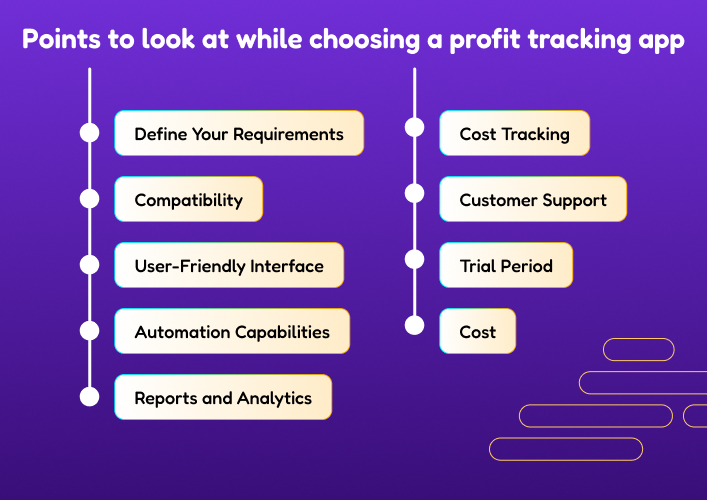
Points to look at while choosing a profit tracking app

Points to look at while choosing a profit tracking app
Ensure that the profit monitoring app you choose integrates easily with your company operations. Furthermore, to get reliable financial information it is important to carefully consider the points given below:
  • Define Your Requirements: Clearly outline your business needs. Determine whether you need basic profit tracking, inventory management, cost of goods sold calculations, or more advanced analytics.
  • Compatibility: Ensure the app is compatible with Shopify. Look for apps that offer smooth integration and real-time synchronization to avoid data discrepancies.
  • User-Friendly Interface: Select an application that has a simple and easy-to-use interface. The tool should be simple for your team to use and collect insightful data from without having a significant learning curve.
  • Automation Capabilities: Take into account applications that can handle monotonous jobs like inventory management and cost updates. Automation lowers the possibility of human mistakes while also saving time.
  • Reports and Analytics: Seek an app with tools for thorough reporting and analytics. It needs to provide information on sales, costs, profit margins, and other critical business-related variables.
  • Cost Tracking: Verify that the app can precisely monitor all of the costs related to your items, such as shipping, taxes, and other out-of-pocket charges. Accurate profit estimates benefit from a comprehensive cost perspective.
  • Customer Support: It is essential to have assistance that is helpful and responsive, particularly when problems arise that must be resolved right away.
  • Trial Period: Take advantage of free trials offered by many apps. This allows you to test the app’s functionality and assess whether it meets your specific requirements before committing to a subscription.
  • Cost: Lastly, compare pricing models of different apps. Consider not only the initial cost but also any additional fees based on your business size and usage.

Best profit tracking apps

Below is a list of some of the best apps to track profit you can find on the Shopify app store.

BeProfit

With BeProfit you can maximize important marketing indicators, such as lifetime earnings and customer lifetime value. This gives you the ability to choose what goods to add to inventory and how to formulate your sales plan. In general, you would choose wiser business moves. This app connects to social media marketplaces that your store is a part of, such as Facebook, to provide precise reporting. To see whether there are any relationships between traffic, sales, and profits, you may connect it to your Google Analytics account. Furthermore, it offers a 7-day free trial plan.

TrueProfit

TrueProfit is another profit tracking app that displays your store’s actual earnings. This tool lets you find your real-time margins automatically by combining all order data. TrueProfit gathers and sorts your spending to provide you with a thorough picture of all of your financial dealings. Furthermore, you can access and analyze important e-commerce information like conversion rates, average order value, and client lifetime value thanks to its wide range of tools. Take advantage of its robust features by exploring its 14-day free trial.

QuickBooks Online Global

QuickBooks is an app of choice if you’re searching for one that makes money management simple by streamlining your accounting procedures. It makes it simple to manage spending, reconcile accounts, and sync Shopify transactions.

Are you unsure about the financial health of your company? Gain knowledge by creating thorough reports and comprehending profit and loss accounts. Also, by having access to tax-ready reports, you can streamline your tax season. QuickBooks is your financial partner, assisting you in maintaining constant control over your funds. It’s more than simply accounting software. Lastly, it offers a 30-day free trial.

SimplyCost

If you want real-time alerts on inventory status, SimplyCost is the finest app apart of just profit tracking. SimplyCost analyzes information from many ad networks to pinpoint the precise areas where you’re overspending. This allows you to reorganize the product suggestions in your store, modify your advertising strategy, and boost sales.

But shipping charges aren’t automatically generated by this software. Each time you calculate inventory, the figures must be manually entered. You can avail 14-day free trial to check its features.

Delirious Profit

It offers the information you need to comprehend your profit margin and is user-friendly. Because of the user-friendly design of this profit tracking app, you don’t need to be an expert in finance to comprehend your figures. To calculate the profit reported per item sold, it takes into account the expenses of items sold.

Obtain comprehensive data on consumer behavior and product performance as well. Popular payment methods and marketing platforms are easily integrated with Delirious Profit, which streamlines your data for a complete picture of your online business.

Conclusion

Selecting the best profit tracking app for Shopify is crucial for the success of your e-commerce business. By considering factors such as features, user interface, pricing, and integration capabilities, you can make an informed decision. Keep in mind your specific business needs and growth potential when evaluating different options.

Ultimately, a comprehensive profit tracking app should provide real-time insights into your financial performance, help you analyze expenses and revenue streams, and offer customizable reporting features.

FAQs

What features should I look for in a profit tracking app for Shopify?
Look for features such as real-time tracking, expense management, revenue analysis, customizable reporting, and integration capabilities with Shopify. The app should provide a user-friendly interface and scalability to accommodate the growth of your business.
Are there free profit tracking apps available for Shopify?
While some apps may offer free versions with limited features, comprehensive profit tracking tools often come with a subscription fee. Evaluate the features offered in free versions and consider upgrading to a paid plan if it better suits your business needs.
Can I integrate multiple e-commerce platforms with a profit tracking app?
Many profit tracking apps are designed to integrate with various e-commerce platforms, including Shopify. Ensure that the app you choose supports integration with the specific platforms you use to manage your online business.
How often should I review my profit tracking metrics?
Regularly reviewing your profit tracking metrics is essential for informed decision-making. Consider conducting weekly or monthly reviews to identify trends, optimize expenses, and make strategic adjustments to improve overall profitability.
Are there any security concerns with using profit tracking apps?
Choose a profit tracking app from reputable developers with a track record of prioritizing security. Look for apps that use encryption and have secure data storage practices to protect your financial information.

The post How to find the best profit tracking app for Shopify? appeared first on Alian Software.

]]>
Which is the best product review app for Shopify? https://staging.aliansoftware.net/shopify-archive/which-is-the-best-product-review-app-for-shopify/ Wed, 22 Nov 2023 15:30:32 +0000 https://aliansoftware.com/?p=34860 We've been advising e-commerce store owners on how to choose the best platforms, applications, and tools to increase conversions and sales for years. Shopify is a leading e-commerce platform because of its extensive app store, which is stocked with revenue-boosting technologies.

Adding a product review app for Shopify shop is a simple way to display customer reviews, star ratings, and other feedback on your products. In this post, there are a few of the best applications for reviewing Shopify products so that you don't have to research more.

The post Which is the best product review app for Shopify? appeared first on Alian Software.

]]>

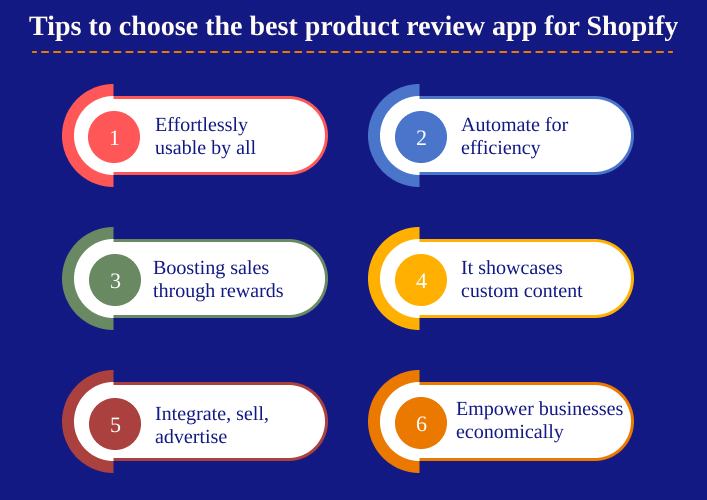
Tips to choose the best product review app for Shopify

Tips to choose the best product review app for Shopify
With the help of Shopify review applications, businesses can easily gather, manage, and display customer feedback in the form of testimonials, reviews, and user-generated material. In addition to loyalty programs and marketing tools, some solutions also allow for automated processes.

Some of the features you should consider are:

  • Simplicity of use for both corporate executives and regular people.
  • Review collection and import automation solutions that save time.
  • Capacity to generate sales via the use of prizes, incentives, and loyalty programs.
  • It can perfectly display bespoke widgets and video/photo reviews.
  • Themes, sales, and advertising platforms from Shopify may be integrated.
  • It must be cost-effective, user-friendly, feature-rich, and powerful and meet the requirements of modern company owners.

List of best product review apps for Shopify

For their easy-to-use features, low prices, and ability to help businesses grow, the following apps stood out as the best product review app for Shopify.

Fera Product Reviews App

The Fera Products Reviews app claims it is the best product review app for Shopify for organizing, gathering, and displaying user-generated information. An adaptable widget for showcasing reviews allows you to do so without diluting the look and feel of your brand. Also, testimonials from many platforms, including Google, Etsy, and Facebook, may be imported with little effort.

Automated review requests are a great way for businesses to stay in touch with consumers, both before and after a transaction is made. In addition, you may incentivize customer reviews with discounts, loyalty points, and other rewards. You’re limited to sending out 10 review requests each month on the free tier of Fera Product Reviews, but you get 10GB of storage space for photos and videos.

Rivyo

Rivyo is a helpful app for boosting sales with persuasive in-store testimonials. Email templates for requesting feedback are available for use. Additionally, it takes just a few minutes to integrate already-verified evaluations from sites like Amazon and AliExpress.

Rivyo makes it simple to choose how you show your reviews too, with widgets that operate on all of the pages of your website. You may optimize your business for rich snippets, include customer reviews on Google Shopping, and more.

Yotpo

Yotpo is a very well-liked app developer in the Shopify market, and their products all aim to boost sales and repeat business. Yotpo is a product review app for Shopify that sends out automatic text and email surveys to consumers in order to gather useful feedback and insights. Yotpo’s marketing and loyalty programs may be integrated with the tool.

Yotpo enables businesses to modify the appearance of the review widget, use intelligent filters to target certain audiences with relevant material, and even censor reviews. In addition, you may highlight star ratings on Google Shopping and highlighted snippets.

Growave

Growave is an effective app for establishing credibility and generating repeat business because of its comprehensive suite of capabilities. You can do a lot more than just automatically ask for feedback from customers with these tools. The app also has features that may help you develop a referral program, reward levels for your most valuable clients, and a loyalty program.

Allowing clients to build wishlists is another option that may boost your business by encouraging repeat purchases. In addition to displaying reviews and star ratings on your shop and in Google search results, Growave now supports several languages.

Okendo

Okendo is an integrated marketing app that may help you learn more about your consumers and increase your Net Promoter Score (NPS). An incentive mechanism is included to incentivize positive reviews and user-generated content displays on the site.

Okendo also provides businesses with the means to conduct surveys for attribution insights, and preference summaries. Additionally, it may work with many other marketing and sales platforms. Analytics and reporting are also integrated.

Reviews.io

Reviews.io makes it easy to get glowing testimonials from satisfied clients. Using this product review app for Shopify, businesses have several options for displaying trust signals. Your Google Shopping Listings and Google Ads star ratings can be integrated to view existing reviews in a matter of minutes.

Even on the free plan, Reviews.io features a plethora of tech connectors, picture and video reviews, and a sizable collection of widgets. You may also create a unique ‘collector’ page to display NPS ratings and feedback from customers.

Conclusion

In conclusion, selecting the best product review app for your Shopify store is a decision that depends on your unique business needs. Whether prioritizing advanced features, user-friendly interfaces, or seamless integrations, options like Yotpo, Rivyo, Growave, and Okendo. Consider factors like budget, desired functionalities, and ease of use to make an informed choice that not only builds trust with customers but also enhances the overall shopping experience on your Shopify platform.

FAQs

Are product reviews important for my Shopify store?
Yes, product reviews are crucial for building trust with potential customers. They provide social proof, help in improving SEO, and can influence purchasing decisions.
Do I need a third-party app for product reviews on Shopify?
While Shopify does have a built-in Product Reviews app, third-party apps often offer more advanced features, customization options, and integrations that can enhance the review process and provide additional benefits.
How do I choose the best product review app for my Shopify store?
Consider factors such as your budget, the features you need (e.g., photo reviews, social media integration), ease of use, and any specific requirements for your business. Many apps offer free trials, allowing you to test them before making a commitment.
Can I import existing reviews to a new app?
Many product review apps provide options for importing existing reviews. However, the process can vary between apps, so check the documentation or contact the app’s support team for guidance.
Do product review apps affect website speed?
The impact on website speed depends on the specific app and how it’s implemented. It’s advisable to choose a reputable app with optimized code, and regularly monitor your website’s performance to ensure it remains fast and responsive.

The post Which is the best product review app for Shopify? appeared first on Alian Software.

]]>
How to sell art online? https://staging.aliansoftware.net/e-commerce/how-to-sell-art-online/ Mon, 13 Nov 2023 15:30:50 +0000 https://aliansoftware.com/?p=34270 Shopify is a great option if you're a creative person interested in selling your art online. Shopify gives artists a robust platform for reaching a worldwide audience with their work because of its user-friendly interface, flexible design options, and low prices. Using Shopify, artists can easily build a customized, high-quality online gallery to sell their art.
Shopify's wide variety of modifiable themes makes it easy for designers to make an online shop unique to their own aesthetic. Each work of art will have its own product page with professional pictures and detailed explanations. Let’s know the step-by-step process to sell art online.

The post How to sell art online? appeared first on Alian Software.

]]>

The benefits of using Shopify to sell art online

You must be having a question in mind about why not Woocommmerce or other ecommerce platforms. It is just because of Shopify’s advanced features over other platforms. Some of the many reasons why creative types use Shopify are mentioned below:

  • User-friendly Interface –Shopify is a platform that makes opening an online shop simple for creatives with few technological skills. Creating a visually appealing storefront is a breeze with the help of the drag-and-drop builder.
  • Customizability – Artists will like the degree of customization Shopify gives. There are many different themes available, and you may modify them to suit your own unique taste. You may customize the style and feel of your shop to suit your tastes.
  • Safer Transactions – Shopify supports a number of popular external payment processors such as PayPal, Stripe, and more, in addition to its own payment gateway, Shopify Payments. Your customers can shop with assurance, and you can collect payments without any hassle.
  • Stock Management – For artists with a large selection of items, Shopify gives comprehensive inventory management capabilities. Manage your inventory of arts and crafts with ease by keeping notes on stock and getting notifications when supplies run short.
  • SEO and Advertising – Shopify has in-built search engine optimization tools to boost your site’s visibility in results pages. In addition, you may promote your paintings and entice potential purchasers by integrating a number of marketing tools and applications.
  • Convenient for mobile devices – Your online shop must be accessible on mobile devices in today’s mobile-first society. Shopify guarantees that your store will display and perform optimally on mobile devices.

Steps of using Shopify to sell art online using Shopify

Steps of using Shopify to sell art online

Now, you need to set up your Shopify store to sell art online. Let’s discuss the steps for selling online.

Create your account

Creating a Shopify account is the first step. Visit Shopify and select ‘Get Started’ to begin creating your online store. You can also test out Shopify for free for three days. A valid email address is required. Next, select ‘Start Free Trial’ to begin your evaluation. Once you’ve done that, you need to answer Shopify’s questions. Simply select the options that most closely match your store when prompted.

Thereafter, select your country and then click the next button to continue setting up your Shopify store and logging in. Once on your Shopify dashboard, you’ll notice the steps of things you have to complete. It includes selecting a price plan, adding a product, and modifying existing templates.

Design your art store

After signing up, you’ll have access to the site editor. Using one of Shopify’s many available themes or templates, you can give your online store a unique look and feel. Select ‘Online Store’ on the left side of the dashboard. You may see how your business will look like with the current layout. The next step is to choose ‘Customize’ to begin modifying the site’s theme. You can also add a video banner in the theme to enhance the look of your artistic products store.

Furthermore, if you don’t like the current theme, you can select a different one from the free options by clicking ‘Add Theme’ under the Customize button. Select a template that you may modify to fit the needs of your company. To make your website more official looking, you may also modify the colors and style.

Add your artistic products

After establishing your online storefront, you can begin adding art items for sale. Click the “Products” tab on your dashboard’s left side, and then click ‘Add product’ to add a new item. When you click the ‘add products’ button, you’ll be sent to a screen where you can specify the art’s name, art’s description, price, and other attributes.

Set payment and shipping methods

You’ll need to establish a means of receiving money before you can begin doing so. The number of accepted payment methods is extensive on Shopify. To configure your chosen payment gateway, choose it from Settings> Payment Provider.

The last step is to arrange for shipping and delivery. To customize how your orders are shipped, select ‘Shipping and Delivery’ from the ‘Settings’ menu. You may provide free delivery, a fixed charge, or shipping costs based on the item’s weight and where it needs to go. This way you can sell digital art or limited edition art on Shopify. Set timers and countdown till the time period ends for limited edition art.

Conclusion

Shopify lets artists sell art online. With its user-friendly interface and a range of features, you can create a professional online store, showcase your artwork, and reach a global audience. By following the steps outlined above and promoting your store effectively, you can successfully sell your art through Shopify.

FAQs

How much does it cost to use Shopify for selling art online?
Shopify offers different pricing plans, starting with a basic plan and scaling up to more advanced options. The cost depends on the plan you choose and any additional apps or features you need.
Do I need technical skills to set up a Shopify store for selling art?
Shopify is designed to be user-friendly, and you don’t need advanced technical skills to set up a basic store. However, some customization and advanced features may require technical expertise or the help of a developer.
Can I sell both physical and digital art on Shopify?
Yes, you can sell both physical and digital art on Shopify. You can create product listings for physical art pieces and use digital products for digital art downloads.
What is the best way to market and promote my art on Shopify?
Effective marketing strategies include using social media, email marketing, content marketing, and search engine optimization (SEO). Engage with your audience through storytelling and behind-the-scenes content.
How can I protect my art from copyright infringement when selling it online?
You can protect your art by watermarking images, registering your copyrights, and clearly stating your copyright policies in your store. Additionally, monitor your art online and take action if you discover any copyright violations.

The post How to sell art online? appeared first on Alian Software.

]]>
What is the Shopify Fulfillment Network? https://staging.aliansoftware.net/shopify-archive/what-is-the-shopify-fulfillment-network/ Wed, 08 Nov 2023 15:30:40 +0000 https://aliansoftware.com/?p=34074 We've explored ecommerce fulfillment services in the past, including ways like third-party logistics, drop shipping, and self-fulfillment. If you're a business owner who would rather outsource the fulfillment process and receive access to a well-established network of warehousing, consider hiring a third-party fulfillment provider like Shopify Fulfillment Network(SFN). This post will provide you with the necessary information about SFN.

The post What is the Shopify Fulfillment Network? appeared first on Alian Software.

]]>

Overview of Shopify Fulfillment Network

The Shopify Fulfillment Network is a storage and fulfillment service provided to merchants by Shopify. Picking, packaging, and shipping are some of the automated order fulfillment capabilities offered by this service. Thus, the time and money spent on logistics like stocking shelves and staffing checkout counters are all eliminated. By outsourcing their fulfillment needs to the SFN, retailers are free to concentrate on expanding their business.

Shopify Fulfillment Network Price

Shopify Fulfillment Network Price

Shopify Fulfillment rates are calculated using a variety of variables, including product dimensions and weight, monthly order volume, and customer location. When budgeting on your fulfillment choices, it’s vital to take all of these considerations into account, since they will affect the final price.

Sellers only need to pay for the delivery of goods to customers. There are also big savings on shipping and storage costs for merchants. Still, the Shopify Fulfillment page doesn’t have any set price because each business gets a unique quote. So, if you want an exact price, you need to sign up for the Shopify Fulfillment plan.

To charge any business for delivery, it takes these things into account:

  • Storage: The number of things you have in stock, the size of your collection, and any yearly changes. They basically want to know how much room you’ll need in the Shopify stores. Furthermore, if the seller has any special storage needs, like keeping your items cool.
  • Packing: The tasks you need to do to find your items and pack them up. Size, weight, and the usual order number are some of the things that matter. Special actions, such as checking certain items in stock or putting together goods for monthly boxes. Furthermore, it also counts the type of packaging you want to use, such as standard tape, boxes, and fillers, or packaging that is made just for you.
  • Transportation: The price of sending an item to a customer, taking into account things like where the customer lives and other factors.

Use of SFN calculator

SFN gives its sellers a useful calculator that they can use to get an idea of how much it will cost to handle their goods. The tool is easy for businesses to use, and they can quickly and accurately make predictions.

For accurate cost predictions, the price tool looks at these things:

  • Size weight
  • Where the package is going
  • Things to meet the storage needs

The calculator is great because it comes with models for everyday things like pots, bowls, sunglasses, and saucepans. You can also add information about your own things.

That’s all. The end price given is just an estimate. To find out how much Shopify Fulfillment will really cost you, you should ask for a custom quote.

Benefits of SFN

With the Shopify Fulfillment Network, you can save money in the following ways:

  • When sellers join the SFN program, they can get cheap shipping with quick delivery times, which means customers don’t have to wait as long.
  • Inventory storage reduces the number of times you run out of stock. It offers dynamic storage space, which means the price changes based on how much stock is in stock at any given time. This makes sure that sellers never run out of stock.
  • Furthermore, it offers clear and simple rates for returns, so there are no extra costs or problems.
  • SFN doesn’t ask sellers to pay anything upfront. With this, small businesses can get the most out of their delivery services without having to spend a lot of money upfront.
  • It also gives sellers discounts for orders with more than one item, which helps them save even more money.
  • You can store as many goods or orders as you want with SFN, and there are no limits on how many you can store. This makes sure that companies can increase their stock without having to worry about extra costs.
  • Once a merchant joins the Shopify Fulfillment Network, they can see all of their sales and packages at once and in real-time.

Conclusion

The Shopify Fulfillment Network is a valuable solution for eCommerce businesses seeking to enhance their order fulfillment operations. By leveraging this network, merchants can scale their business, reduce shipping costs, and improve customer satisfaction by ensuring faster and more reliable delivery of products. It’s a strategic move by Shopify to offer a comprehensive eCommerce ecosystem to its users.

FAQs

How does the Shopify Fulfillment Network work?
Businesses store their products in Shopify’s fulfillment centers. When customers place orders, the network automatically routes them to the nearest fulfillment center for quick and efficient shipping.
Is the Shopify Fulfillment Network available globally?
The network was primarily available in the United States and Canada.
What are the benefits of using the Shopify Fulfillment Network?
Benefits include reduced shipping times and costs, improved inventory management, access to competitive shipping rates, and a streamlined order fulfillment process.
Can I use the Shopify Fulfillment Network with any eCommerce platform?
The network is primarily designed to work with Shopify’s eCommerce platform. While there are other third-party fulfillment services available, they may not offer the same level of integration and convenience.
What type of businesses is the Shopify Fulfillment Network suitable for?
The network is ideal for eCommerce businesses of various sizes that want to improve their order fulfillment and delivery services, especially those using Shopify as their eCommerce platform.

The post What is the Shopify Fulfillment Network? appeared first on Alian Software.

]]>
How to add a Dawn theme video banner in Shopify? https://staging.aliansoftware.net/ui-ux/how-to-add-a-dawn-theme-video-banner-in-shopify/ Thu, 02 Nov 2023 15:30:19 +0000 https://aliansoftware.com/?p=33907 The Dawn template is familiar to Shopify users. It's one of the most versatile and flexible free themes out there, making it a great choice for anybody looking to set up shop online. Multiple modules, including a video upload block and an image banner, are included with the Dawn theme. The picture serves as the backdrop in an image banner while buttons and text occupy the foreground. The video module does not support this kind of foreground, unfortunately. However, it is possible to combine the two by making a video banner in which the video is in the background and the text occupies the banner's foreground.

This guide will teach you how to make a Dawn theme video banner in Shopify, perfect for attracting visitors.

The post How to add a Dawn theme video banner in Shopify? appeared first on Alian Software.

]]>

Why should you put the Dawn theme video banner?

Why should you put the Dawn theme video banner

A video banner is a section of a website that has a full-width video as its background, with additional components like buttons and text shown in the front. Key benefits of the dawn theme video banner include the following:

  • Increased visual appeal via the use of compelling films to get the interest of website visitors.
  • The video material is dynamic and interesting. They may keep visitors interested by showcasing product features, demonstrating how something is done, or telling an interesting brand narrative.
  • Furthermore, videos may leave a long-lasting impact on site visitors, increasing their likelihood of returning.
  • The brand’s message may be conveyed to consumers via a video banner. Therefore, it’s a great way for companies to promote their offerings, get recognition in the marketplace, and stand out from the competition. You can make your site more engaging and increase your conversion rate by using video.

What are the steps to add the Dawn theme video banner?

  • Step 1: Convert the video into WEBP file format
    You may find several free online “video to WebP” converters. You may do a search or utilize Ezgif or Converter MC. Thereafter, upload your video in the converter tool, and select to convert it to the WebP format. Save the updated file to your PC.
  • Step 2: Customize Dawn theme in Shopify
    Go to Online Store > Themes. Thereafter, you should get the Dawn theme active if you haven’t already. If not, the Dawn theme will be labeled as Shopify’s ‘Current Theme.’ Click on the ‘Customize’ button to start.
  • Step 3: Add Image Banner Block After you install the Dawn theme, the ‘Image Banner’ block is already there. Therefore, clicking on that section will allow you see its choices in the left side. Additionally, you can click on the picture ad itself in the viewing window on the right. If you need to add the “Image Banner” from scratch, click on the ‘Add Block’ link.
  • Step 4: Upload the WEBP file
    Click the ‘Select image’ button under the ‘First image’ section. This takes you to a page where you may add pictures to your shop’s gallery. Video URLs may be pasted in as an alternative, but we’ll be using the upload feature instead. Click the ‘Add images’ button and then choose the WebP file you just made. Check the box next to the file you just uploaded, and then press the ‘Done’ button. To save your changes, choose ‘Save’. A video banner with the Dawn theme has been added.
  • The video should appear well, play smoothly, and have the correct quality, but first a front-end preview should be performed. Click the eyeball symbol to return to the dashboard’s main page, where you may then choose ‘View your online store’.

How to make the Dawn theme video banner unique?

The ability to tailor your video to the look and feel of your business is a huge plus. You may alter the banner’s height and adjust the opacity of the picture overlay. The location of the overlay text can also be adjusted by moving the desktop content. Changing where the information and buttons are shown allows you to put them over the most visible part of the video. Additionally, you have access to a “Custom CSS” area.

Conclusion

Adding a Dawn theme video banner is a great way to enhance your website’s visual appeal and engage your visitors. The steps involved are relatively straightforward, but the final look and feel of your video banner can be highly customized to match your brand identity and message. In case, you want to customize your store in a unique way and make it engage more users, contact expert Shopify Partners.

FAQs

What size is the dawn banner on Shopify?
The size of dawn banner on Shopify is 1920 x 1080 px for desktop and the 800 x 800 px for mobile.
Is the dawn theme good for Shopify?
Yes, the Dawn theme is designed to be responsive and is good for startups.
How do I customize my Shopify banner?
Go to Online Store > Themes. Click on the ‘Customize’ button to start.
How can I make my video banner accessible to all users?
It’s important to provide alternative text for users who can’t view the video, such as text or images. This ensures accessibility for everyone, including those with disabilities.
Is there a way to add a video banner to multiple pages on my site?
You can typically add a video banner to multiple sections or pages by replicating the customization steps in the Theme Editor for each desired location.

The post How to add a Dawn theme video banner in Shopify? appeared first on Alian Software.

]]>
Tips to Boost Shopify Store for new e-commerce owners https://staging.aliansoftware.net/e-commerce/tips-to-boost-shopify-store-for-new-e-commerce-owners/ Mon, 30 Oct 2023 15:30:56 +0000 https://aliansoftware.com/?p=33442 Creating a new Shopify shop is always a thrilling adventure. But there will be difficulties, just as there would be with any other endeavor. To help you boost Shopify store and succeed in today's e-commerce industry, this post provides some tips and essential pointers.

The post Tips to Boost Shopify Store for new e-commerce owners appeared first on Alian Software.

]]>

How to boost Shopify store?

How to boost Shopify store?

Build your brand identity

Keep in mind that there are already thousands of companies selling the same items or services that your new Shopify site will be selling. A catchy logo and slogan can make your company stand out.

Furthermore, you can’t reduce branding to a logo and some catchy colors. It’s a low-key approach to making an impact on your target audience’s feelings. Create a name for your brand that speaks to its values. Engage their sense of being a part of something really special. Your brand identity should convey your core beliefs, the company’s vision, and the nature of your goods. An effective strategy to win over customers and convince them to select your brand over the competition is to develop a memorable brand identity.

Select appropriate theme

When first starting out with Shopify, many users make the mistake of applying arbitrary themes to their business. The issue is that it is not consistent with the brand.

The fewer adjustments you have to make, the more appropriate theme you choose. It’s a critical component of brand building as well. While there is no universally correct theme, it is important that your company’s theme convey what it has to offer to customers. There are more than 150 alternatives to choose from to boost Shopify store including both paid and free themes in the Shopify theme shop. Keep in mind that the premium themes are not always superior to the free ones. Thus, you can stop worrying about whether or not a free theme will work. Find one that speaks to your brand and has the functionality you want, then alter it to your satisfaction.

Make use of high-quality images

The importance of having high-quality images for your Shopify store cannot be overstated. Your shop’s success is directly proportional to the quality of the product photographs and videos you upload. A product’s price tag is not always indicative of its quality. Customers will have more trust in their purchase after seeing high-quality images.

Make your store’s policies clear

One thing that potential shoppers will check out on your Shopify store is your return policy. Customers are more likely to shop if they know what to expect from you about refunds and exchanges. Thus, to boost Shopify store, keep all of your store’s policies listed, like the website footer to drive more business. You may obtain Shopify’s policy template from your admin panel. Make minor adjustments as needed, taking care not to leave out any essential information.

Add gamification

Add unique touches that set you apart from the competition. Website gamification seems like a great strategy to get this done. Adding some humor to your online store’s homepage has been shown to increase traffic and conversion rates. Spin-to-win and falling gift games can transform your e-commerce site into an engaging and entertaining destination for your visitors. The purpose of this is to keep visitors on your site for longer which will boost Shopify store and your chances of generating new leads. It may also be used to passively expand your email subscriber base.

Use Social Media to Market Your Store

It’s natural for a new business owner to want to see immediate results, leading them to choose paid advertising as their first option. However, sponsored advertisements are not helpful if you want to boost Shopify store. Since consumers aren’t familiar with your company name, they have no reason to put their faith in you.

Avoid unnecessary expenditures by focusing on organic traffic generation via social media marketing. Using the reach of social media, you can increase awareness of your company and win over new clients. Create profiles on several social media, such as Instagram, Facebook, TikTok, and others of a similar kind. The next step is to routinely upload material like photos and videos to each site while using hashtags and popular music.

Make sure the material you provide is relevant to your audience. You may also write comments underneath the posts of influential people in your field, or repost their information.

Conclusion

When you first start out in the e-commerce world, it might be difficult to get your Shopify store off the ground. Keep in mind the importance of search engine optimization, user experience optimization, social media marketing, email marketing, and constant performance analysis and improvement. You can boost Shopify store if you put effort into building your brand, satisfying your customers’ needs, and keeping up with the latest developments in your field.

FAQs

What's the first step to starting a successful Shopify store?
The first step is to research your niche and target audience. Understand your competitors, identify your unique value proposition, and ensure there’s demand for your products.
How important is SEO for a Shopify store's success?
SEO is crucial for driving organic traffic to your store. Optimizing product descriptions, blog content, and meta tags can help improve your store’s visibility on search engines and attract potential customers.
What are some effective email marketing strategies for e-commerce?
Effective email marketing strategies include personalized product recommendations, cart abandonment emails, customer feedback requests, and exclusive offers for subscribers. Building a segmented email list is also essential.
What role does social media play in e-commerce success?
Social media is a powerful tool for building brand awareness, engaging with customers, and driving traffic to your Shopify store. Platforms like Instagram and Facebook are particularly effective for e-commerce businesses.
How can I build trust with my customers as a new e-commerce owner?
Trust can be built through transparent communication, offering secure payment options, providing excellent customer service, and displaying customer reviews and testimonials on your website. Consistency and professionalism are key.

The post Tips to Boost Shopify Store for new e-commerce owners appeared first on Alian Software.

]]>