Deprecated: Return type of Ai1wm_Recursive_Directory_Iterator::hasChildren($allow_links = true) should either be compatible with RecursiveDirectoryIterator::hasChildren(bool $allowLinks = false): bool, or the #[\ReturnTypeWillChange] attribute should be used to temporarily suppress the notice in /home/stagingaliansoft/public_html/wp-content/plugins/all-in-one-wp-migration-unlimited-main/lib/vendor/servmask/iterator/class-ai1wm-recursive-directory-iterator.php on line 57

Deprecated: Return type of Ai1wm_Recursive_Directory_Iterator::rewind() should either be compatible with FilesystemIterator::rewind(): void, or the #[\ReturnTypeWillChange] attribute should be used to temporarily suppress the notice in /home/stagingaliansoft/public_html/wp-content/plugins/all-in-one-wp-migration-unlimited-main/lib/vendor/servmask/iterator/class-ai1wm-recursive-directory-iterator.php on line 35

Deprecated: Return type of Ai1wm_Recursive_Directory_Iterator::next() should either be compatible with DirectoryIterator::next(): void, or the #[\ReturnTypeWillChange] attribute should be used to temporarily suppress the notice in /home/stagingaliansoft/public_html/wp-content/plugins/all-in-one-wp-migration-unlimited-main/lib/vendor/servmask/iterator/class-ai1wm-recursive-directory-iterator.php on line 42

Deprecated: Return type of Ai1wm_Recursive_Extension_Filter::getChildren() should either be compatible with RecursiveFilterIterator::getChildren(): ?RecursiveFilterIterator, or the #[\ReturnTypeWillChange] attribute should be used to temporarily suppress the notice in /home/stagingaliansoft/public_html/wp-content/plugins/all-in-one-wp-migration-unlimited-main/lib/vendor/servmask/filter/class-ai1wm-recursive-extension-filter.php on line 47

Deprecated: Return type of Ai1wm_Recursive_Extension_Filter::accept() should either be compatible with FilterIterator::accept(): bool, or the #[\ReturnTypeWillChange] attribute should be used to temporarily suppress the notice in /home/stagingaliansoft/public_html/wp-content/plugins/all-in-one-wp-migration-unlimited-main/lib/vendor/servmask/filter/class-ai1wm-recursive-extension-filter.php on line 37

Deprecated: Return type of Ai1wm_Recursive_Exclude_Filter::getChildren() should either be compatible with RecursiveFilterIterator::getChildren(): ?RecursiveFilterIterator, or the #[\ReturnTypeWillChange] attribute should be used to temporarily suppress the notice in /home/stagingaliansoft/public_html/wp-content/plugins/all-in-one-wp-migration-unlimited-main/lib/vendor/servmask/filter/class-ai1wm-recursive-exclude-filter.php on line 41

Deprecated: Return type of Ai1wm_Recursive_Exclude_Filter::accept() should either be compatible with FilterIterator::accept(): bool, or the #[\ReturnTypeWillChange] attribute should be used to temporarily suppress the notice in /home/stagingaliansoft/public_html/wp-content/plugins/all-in-one-wp-migration-unlimited-main/lib/vendor/servmask/filter/class-ai1wm-recursive-exclude-filter.php on line 37

Deprecated: Return type of Ai1wm_Recursive_Newline_Filter::accept() should either be compatible with FilterIterator::accept(): bool, or the #[\ReturnTypeWillChange] attribute should be used to temporarily suppress the notice in /home/stagingaliansoft/public_html/wp-content/plugins/all-in-one-wp-migration-unlimited-main/lib/vendor/servmask/filter/class-ai1wm-recursive-newline-filter.php on line 28
Project Management Archives - Alian Software https://staging.aliansoftware.net/category/project-management/ Best Web & Mobile App Development Company Mon, 27 May 2024 04:16:32 +0000 en-US hourly 1 https://wordpress.org/?v=6.8.3 https://staging.aliansoftware.net/wp-content/uploads/2022/08/favicon.png Project Management Archives - Alian Software https://staging.aliansoftware.net/category/project-management/ 32 32 How to use AI in real estate? https://staging.aliansoftware.net/project-management/ai-in-real-estate/ Fri, 17 May 2024 15:30:37 +0000 https://aliansoftware.com/?p=46323 The days of solely relying on manual processes to navigate the buying, selling, or renting properties are gone. AI offers a transformative approach, revolutionizing how real estate professionals, investors, and consumers interact with the market.

In this blog, we will look into the diverse use cases of AI in real estate, exploring how this technology is streamlining operations. Furthermore, we will look into how AI in commercial real estate enhances decision-making and redefines the future of property transactions. From predictive analytics to virtual assistants, AI is paving the way for a smarter, more dynamic real estate ecosystem. Let’s understand this in detail.

The post How to use AI in real estate? appeared first on Alian Software.

]]>

Use Cases of AI in real estate

AI’s capacity to improve client experiences, accelerate decision-making, and streamline procedures is transforming the real estate sector. Key use cases of AI in real estate include the following:

Property Valuation

AI algorithms analyze vast amounts of data including market trends, property features, location, and comparable sales to accurately estimate property values. This aids customers in making wise judgments and sellers in setting competitive rates.

Virtual Property Tour

Using virtual reality (VR) and augmented reality (AR) technologies, AI in real estate can create experiences without the need for physical visits. Potential buyers can explore properties remotely, saving time and resources for both buyers and sellers.

Customer Service Chatbots

AI-powered chatbots provide instant responses to customer inquiries, schedule property viewings, and provide information about listings, thereby enhancing customer service and engagement. These chatbots can handle repetitive tasks, freeing up human agents to focus on more complex queries.

Property Management

Property managers can anticipate maintenance needs, maximize rental rates, and spot possible problems like late payments or vacancies with the use of artificial intelligence. Automated systems can optimize rental income, enhance tenant happiness, and expedite administrative processes.

Lead Generation

AI algorithms examine consumer behavior, tastes, and demographics to find possible leads and tailor advertising campaigns. This focused strategy yields higher-quality leads and improves the efficacy of marketing initiatives.

Fraud Detection

Furthermore, AI systems evaluate credit reports, financial data, and property details to determine how risky mortgage applications and rental contracts are. Moreover, AI lessens financial losses for both buyers and sellers by assisting in the detection of illegal activities like identity theft and property fraud.

Smart Home Technology

Smart home appliances with AI capabilities improve convenience, security, and energy efficiency for homeowners. These gadgets may automate functions like lighting, security monitoring, and temperature management, enhancing both the living space and the total value of the home.

Market Analysis

Real-time market data analysis is done by AI platforms to reveal information about market trends, property performance, and investment prospects. This supports investors in optimizing their investment portfolios for optimum returns and making data-driven decisions.

Examples of AI in real estate industry

enterprise performance management software

To get a deeper understanding, let’s go through the real-life use cases of AI in real estate industry.

  • Trulia: Headquartered in San Francisco, Trulia uses AI for personalized suggestions in real estate and to improve customer experience. Thus, this AI-powered app for real estate tailors property suggestions based on user activity, search history, and given preferences.
  • Zillow: Zillow, a well-known real estate company, uses artificial intelligence to scan digital pictures and other pertinent parameters and provide free property value estimates. Thus, this approach uses a neural network trained on large datasets including millions of images and their related house values. It reads photographs from fresh property postings to extract useful information.
  • Redfin: It is using AI in real estate, data science, and other technologies to improve decision-making and produce better results. Furthermore, the firm collaborates with mixed landlords to provide service models such as lease-to-own.
  • Entera: It is a real estate investing platform. Entera uses AI for predictive analytics based on market data and provides ideation to users. Thus, AI helps in making important decisions for buying property understanding the demand and requirements. Its headquarters is in New York & platform manages over 1,000 monthly transactions.

Conclusion

In summary, AI in real estate is transforming the real estate sector by providing cutting-edge solutions that boost productivity, sharpen judgment, and improve client experiences.

AI is changing the way that real estate agents, investors, and customers engage with the market. Examples of this include chatbots for customer support, virtual property tours, and property assessments.

Instances from businesses like Entera, Zillow, Redfin, and Trulia demonstrate the usefulness of AI in a variety of real estate-related contexts. AI’s contribution to the real estate business will only grow as it develops, opening the door for a more intelligent and dynamic sector.

FAQs

How does AI impact property valuation accuracy?
AI analyzes vast amounts of data, including market trends and property features, to accurately estimate property values. This data-driven approach enhances valuation accuracy by considering various factors that traditional methods might overlook.
Can AI-powered virtual assistants personalize property suggestions for buyers?
Yes, AI-powered virtual assistants can personalize property suggestions by analyzing user activity, search history, and preferences. This allows them to recommend properties that align with the buyer’s specific needs and preferences, enhancing the overall customer experience.
What role does AI play in detecting and preventing fraudulent activities in real estate transactions?
AI systems evaluate credit reports, financial data, and property details to assess the risk associated with mortgage applications and rental contracts. Additionally, AI helps detect fraudulent activities such as identity theft or property scams, reducing financial losses for both buyers and sellers.
How do AI algorithms optimize rental income for property managers?
AI algorithms analyze market trends, tenant behavior, and property data to optimize rental prices, predict maintenance needs, and identify potential issues such as late payments or vacancies. This helps property managers maximize rental income while ensuring tenant satisfaction.
What are the advantages of using AI in market analysis for real estate investment decisions?
AI platforms analyze real-time market data to provide insights into market trends, property performance, and investment opportunities. This helps investors make data-driven decisions, optimize their investment portfolios, and maximize returns on their real estate investments.

The post How to use AI in real estate? appeared first on Alian Software.

]]>
How to find the best digital project manager tool? https://staging.aliansoftware.net/project-management/digital-project-manager-tool/ Wed, 15 May 2024 15:30:30 +0000 https://aliansoftware.com/?p=45868 A trustworthy digital project manager tool is a requirement in this digital era. With so many alternatives in the market, it becomes difficult to choose the right one. Thus, in this blog, you can find the ways to get the right tool for digital project management and how to use it.

The post How to find the best digital project manager tool? appeared first on Alian Software.

]]>

What is digital project management?

enterprise performance management software

The use of digital project manager tools, strategies, and resources in the context of project management is known as digital project management. 

It includes creating, developing, or implementing services, or solutions. For instance, websites, software programs, mobile apps, digital marketing campaigns, and more are usually included in these initiatives.

Digital project management includes all aspects of organizing, carrying out, overseeing, and managing projects. Thus, managers can make sure that they have finished on schedule and within budget.

It involves coordinating the efforts of team members, stakeholders, and resources, as well as managing risks and addressing challenges that may arise during the project lifecycle.

Key aspects of a digital project manager tool include:

  • Scope Management: Defining the project objectives, requirements, and deliverables.  Furthermore, it ensures effective communication with stakeholders.
  • Schedule Management: Furthermore, developing project schedules, timelines, and milestones, and monitoring progress to ensure that deadlines are met.
  • Resource Management: Allocating and managing resources. Food instance, personnel, finances, and materials to support project activities.
  • Risk Management: Identifying potential risks and uncertainties that may impact the project, and developing strategies to mitigate or manage them.
  • Communication: Facilitating clear and effective communication among project team members, stakeholders, and other relevant parties.
  • Collaboration: Encouraging collaboration and teamwork among project team members, often facilitated through digital collaboration tools and platforms.
  • Quality Management: Ensuring that project deliverables meet quality standards and requirements, and implementing processes for QA.


Thus, the digital project manager tool is essential for successfully navigating the complexities of projects, ensuring that they are delivered on time, within budget, and to the satisfaction of stakeholders.

It requires a combination of organizational skills, and effective communication to drive projects forward and achieve desired outcomes in today’s digital landscape.

Ways to find a digital project manager tool

The productivity, teamwork, and overall project success of your team may all be greatly increased by selecting the appropriate digital project manager solution. Here are a few methods to find the ideal tool:

  • Online Research: Start by conducting online research to explore different project management tools. Look for reviews, comparisons, and user feedback to gain insights into the features, and weaknesses of each tool.
  • Trial Periods and Demos: You may test out project management software before committing to it with many of them offering free trial periods or demo versions. Utilize these chances to explore the features and capabilities of various tools and determine how well they meet your needs.
  • Codecanyon: Join online communities and search on Codecanyon to choose the right digital project manager. Engage with other professionals in discussions about digital project management tools, ask for recommendations, and share feedback and experiences.
  • Evaluate Your Requirements: Before selecting a project management tool, clearly define your requirements. Consider factors such as team size, project complexity, budget, integration capabilities, and desired features to narrow down your options.
  • Read Case Studies and Success Stories: Look for case studies and success stories from organizations that have successfully implemented digital project management tools. These real-life examples can provide valuable insights into how different tools have been used to improve project outcomes.
  • Consult with Tech Experts: When assessing project management software, consult your organization’s IT or tech specialists for guidance and expertise. They can provide insightful information on compatibility problems, best practices for implementation, and technical factors.
  • Check Websites and Documentation: To find out more about project management tool providers’ offerings, features, costs, and support choices, visit their websites. Examine FAQs, client feedback, and documentation to obtain more details.

Comprehensive Digital Project Manager – Alian Hub

There is just one ideal digital project manager for teams – Alian Hub. It includes cutting-edge functionality and careful consideration of the budget. 

This project management application makes it simple to organize projects, assign individuals, create and monitor tasks, and manage workload. 

Alian Hub is an easy, affordable digital project management tool for contemporary teams. You may easily manage your workspace with its help.

Using Time Tracker, users may monitor their work on specific projects. This special Time Tracker keeps track of all user actions, including keystrokes and mouse use counts.

Additionally, this modern digital project management solution has built-in channels and chats for collaboration. A close examination of the project specifics is possible using several project views, such as Kanban, Calendar, Table, and List. 

Moreover, users may add new fields to the tasks to further modify and detail them. It also facilitates the creation and monitoring of milestones. 

Users may quickly and easily locate what they need with the use of custom filters and quick searches. As a result, it is an all-inclusive, reasonably priced project management tool that will support business expansion. 

Conclusion

Achieving success in the ever-changing field of digital project management requires careful tool selection. The digital project manager – Alian Hub is indispensable for handling the intricacies of projects. From setting project objectives to allocating resources and guaranteeing efficient communication, you get everything you want. Through the use of a variety of techniques, including trial periods, expert consultations, and internet research, teams may find the best solution that meets their unique demands and specifications. 

In the current digital era, teams must be empowered to accomplish their objectives and produce outstanding outcomes by utilizing the appropriate digital project management technology, which can streamline workflows, improve teamwork, or boost productivity.

FAQs

Can Alian Hub integrate with other software applications?

No, Alian Hub doesn’t offer integration with popular software applications such as Slack, Google Drive, Microsoft Office, and more. It allows you to streamline your workflow and enhance collaboration in the company.

Is there a mobile app available for Alian Hub?

Alian Hub is a mobile responsive app that can be accessed in the mobile browser enabling you to manage your projects and tasks on the go. Thus, it offers similar functionality to the web, ensuring that you stay connected and productive through any device.

Can I customize Alian Hub to suit my team's specific needs?

Yes, Alian Hub offers extensive customization options, allowing you to tailor the platform to meet your team’s unique requirements. From custom fields and project views to personalized workflows and notification settings, you have the flexibility to adapt Alian Hub to suit your workflow preferences.

What kind of support does Alian Hub offer?

Alian Hub provides comprehensive customer support through various channels, including email, live chat, and help center resources. Additionally, users have access to regular updates, tutorials, and training materials to maximize their usage of the platform and address any questions or concerns they may have.

Is Alian Hub suitable for remote teams?

Yes, Alian Hub is an excellent choice for remote teams, offering robust collaboration features, real-time communication tools, and flexible project management capabilities.

The post How to find the best digital project manager tool? appeared first on Alian Software.

]]>
Low cost project management software for smart teams https://staging.aliansoftware.net/project-management/low-cost-project-management-software-for-smart-teams/ Tue, 14 May 2024 15:32:44 +0000 https://aliansoftware.com/?p=45854 Effectiveness and cooperation are essential components of successful project management. Thus, project management tools make all the difference in today’s hectic digital environment. Low cost project management software optimizes operations and promotes smooth team communication. However, with so many alternatives available, it can be difficult to locate the ideal fit without going over your budget. You need not worry, though, because here is the list of affordable project management software suitable for small or large teams.

The post Low cost project management software for smart teams appeared first on Alian Software.

]]>

Must-have Features of low cost project management software

When considering low cost project management software, it’s essential to ensure that it still offers the necessary features. Here are some must-have features to look for without breaking the bank:

  • Task Management

    It must be able to create, allocate, prioritize, and monitor tasks. Search the affordable project management software that enables all the functionalities mentioned above. Furthermore, the tool must have different project views to have a close watch on the projects.

  • Collaboration Tools

    Successful project collaboration is important. To promote communication, instead of using other chatting and file-sharing tools, the cheap project management tool must have an in-built chat and file-sharing option. Thus, look for tools that provide file sharing, real-time chat or messaging, commenting on tasks or documents, and @mentions.

  • Calendar and Scheduling

    A calendar view with the ability to schedule tasks, set deadlines, and visualize project timelines is essential. Look for software that offers calendar integration and the ability to set reminders for upcoming deadlines.

  • Project Planning and Gantt Charts

    Project planning tools and Gantt charts are crucial for visualizing project timelines, dependencies, and milestones. Look for software that allows for the creation and customization of Gantt charts to plan and track project progress effectively.

  • Team and User Management

    The ability to manage team members, roles, and permissions is important for ensuring that the right people have access to the right information. Thus, look for software that allows for easy user management and customizable access levels.

  • Reporting and Analytics

    Reporting and analytics features provide valuable insights into project progress, performance, and resource utilization. Thus, look for software that offers reporting dashboards, customizable reports, and analytics tools to track project KPIs and identify areas for improvement.

  • Integration Capabilities

    Integration with other tools and platforms is essential for streamlining workflows and enhancing productivity. Thus, look for affordable project management software that offers integration with popular tools such as email, calendar, document sharing, and team communication tools.

  • Mobile Accessibility

    Mobile accessibility allows team members to manage tasks and collaborate on the go. Thus, find an online project management software that offers a mobile-responsive interface for easy access from smartphones and tablets.

  • Customization Options

    Every team has unique needs and workflows, so look for software that offers customization options to tailor the platform to your specific requirements. This might include customizable task fields, project templates, and branding options.

  • Affordability and Scalability

    Lastly, ensure that the best cheap project management software offers scalability as your team grows and your projects become more complex. Thus, look for flexible pricing plans and the ability to upgrade or downgrade as needed without incurring significant costs.

Benefits of using project management tools

enterprise performance management software

There are several advantages to using low cost project management software. They may greatly improve teamwork, production, and efficiency. The following are some of the main benefits of project management tools: 

  • Improved Task Organization: With features like task lists, deadlines, and priority levels, cheap project management software helps in organizing work. Thus, this clarity minimizes uncertainty and missed deadlines by assigning tasks.
  • Enhanced Time Management: Furthermore, project management tools assist teams in better time management through time monitoring & scheduling.
  • Increased Accountability: Online project management software allows team leaders to assign tasks and track real-time progress. This fosters responsibility among team members, as everyone knows who is accountable for each task. Thus, tasks are completed on time.
  • Streamlined Collaboration: Additionally, collaboration is made seamless with features like file sharing, commenting, and real time chat with low cost project management software. Team members can work together on tasks and projects without the hassle of emailing files back and forth. This leads to smoother workflows and faster decision-making.
  • Better Resource Allocation: Project management tools provide insights into resource allocation through workload reports. This allows teams to allocate resources efficiently and avoid bottlenecks. Thus, managers can ensure that projects stay on track and are completed within budget.
  • Data-driven decision-making: Reporting and analytics are mostly available in every online project management software. This feature gives useful insights about the status, effectiveness, and use of resources in the project. Therefore, teams can use this information to pinpoint areas for improvement. 
  • Scalability: Furthermore, a cheap project management tool is easily scalable to meet the changing demands of teams. These tools are versatile enough to accommodate any kind of scenario. Thus, scope enlargement, integration of technologies, etc. can be easily taken care of.

Which is the best low cost project management software?

Keeping the budget in mind and advanced features, there is one ultimate project management solution for teams. Alian Hub is a smart low cost project management software for modern teams. It allows you to handle your workspace with ease.

Manage projects, create and track tasks, assign members, and manage workload easily with this project management tool. Track the work done by the users in particular projects with Time Tracker. This unique Time Tracker monitors every user action like keystrokes and mouse usage counts and can be viewed in Tracker Timesheet.

Furthermore, this modern online project management software has in-built collaborative functions like Chats & Channels. You can look closely at the project details with different project views like Kanban, Calendar, Table & List. Moreover, to customize and add more details to the tasks, users can add custom fields. 

It also helps in releasing milestones and keeping track of them. With quick search and custom filters, users can easily find out what they need without spending time. Thus, it is a comprehensive affordable project management software that will help your company grow. 

Conclusion

A team’s or organization’s ability to successfully manage projects is essential in today’s fast-paced digital world. Low cost project management software provides a workable way to improve communication, streamline processes, and optimize operations. 

Task management, communication tools, scheduling capabilities, reporting analytics, and other essential elements enable teams to operate effectively and accomplish their objectives. 

Alian Hub distinguishes out from the competition as a smart and cheap project management tool made for contemporary teams. Alian Hub’s extensive feature set, user-friendly design, and scalability allow for smooth project execution and help businesses succeed in a cutthroat market.

FAQs

Is Alian Hub suitable for both small and large teams?

Yes, Alian Hub is designed to cater to the needs of both small and large teams, offering scalability and flexibility to accommodate varying project sizes.

Can I customize Alian Hub to fit my team's specific requirements?

Absolutely, Alian Hub provides customization options such as adding custom fields to tasks, adjusting project views, and incorporating personalized workflows to align with your team’s unique needs.

How does Alian Hub ensure data security and privacy?

Alian Hub prioritizes data security and privacy by allowing companies to secure that data in their own database.

Does Alian Hub offer customer support and training resources?

Yes, Alian Hub provides comprehensive customer support and training resources to assist users in maximizing the platform’s capabilities and addressing any queries or issues they may encounter.

Can I integrate Alian Hub with other tools and platforms we currently use?

No. Alian Hub doesn’t offer integration capabilities with popular tools and platforms. It has inbuilt features such as real-time chat, comments, and document sharing allowing for streamlined workflows and enhanced productivity.

The post Low cost project management software for smart teams appeared first on Alian Software.

]]>
Cost guide to developing BNPL apps like Afterpay https://staging.aliansoftware.net/project-management/cost-guide-to-developing-bnpl-apps-like-afterpay/ Tue, 14 May 2024 15:30:28 +0000 https://aliansoftware.com/?p=46188 Apps that let users purchase now and pay later have completely changed how consumers buy. Leaders in the BNPL space, including Afterpay, are driving this change. Millions of people all around the world have been drawn to its smooth, interest-free payment options. Thus, apps like Afterpay are completely changing the way people think about credit. However, it's important that entrepreneurs hoping to make a profit from BNPL comprehend the expenses associated with creating these kinds of programs. Let’s explore the complexities of creating BNPL apps like Afterpay in this post.

The post Cost guide to developing BNPL apps like Afterpay appeared first on Alian Software.

]]>

Which are the must-have features of BNPL apps like Afterpay?

Below are the useful features to add while developing apps like Afterpay. Let’s explore this in detail.

Basic Features

  • User Panel: The user panel gives users access to create accounts, log in, make changes to payment methods, real-time notifications, data configuration, etc. Furthermore, it also includes features like customer support, FAQs, live chat, etc. Developers can also include personal merchant suggestions for this panel.
  • Merchant Panel: With the help of this panel, businesses can efficiently manage stock, obtain insights into transactions, and link their POS systems. Customer behavior, transaction analytics, etc can help merchants get deeper insights into their sales. Furthermore, marketing features like ads and campaign creation are useful basic features to add to apps like Afterpay.
  • Admin Panel: In this panel, administrators should be able to monitor transactions in real time. Furthermore, it should give admins access to control financial operations. It must have permission to ban merchant or user accounts and solve disputes. Tools for risk management should also be added to this panel.

Advance Features

  • AR/VR integration: Before making a purchase, customers may virtually test things out thanks to augmented reality technology. Thus, adding this feature decreases return rates and enhances the online purchasing experience.
  • Credit Score Monitoring: Secondly, incorporate credit score monitoring systems to give consumers information about the state of their credit. Provide advice and suggestions on how to raise users’ credit ratings and increase their financial knowledge.
  • Budgeting: Give consumers thorough insights into their spending patterns by classifying their purchases and monitoring their spending over time. Thus, provides spending, budgeting tools, and notifications to assist people in handling their money sensibly.
  • Exclusive Offers and Rewards: Furthermore, collaborate with retailers to provide BNPL apps like Afterpay users access to exclusive discounts, cashback incentives, or loyalty points. These rewards have the power to boost consumer loyalty and promote recurring use.
  • Split Payments: Enable consumers to pay in part for shared purchases with friends or family. When it comes to pooled spending or group presents, this option may be quite helpful.

Through the integration of these functionalities, a BNPL application may stand out from the competition, draw in new users, and offer benefits beyond simple payment processing. Additionally, these features can increase user loyalty and engagement over the long run, which will help the app succeed and last.

How do you monetize BNPL apps like Afterpay?

enterprise performance management software
There are many monetization strategies that BNPL apps like Afterpay can use. Here are some of them:
  • Transaction Fees: Charging merchants a small charge for each transaction handled through the platform is one of BNPL applications’ main sources of income. Various factors, including transaction volume, merchant size, and industry, may affect these costs.
  • Late Fees: If users fail to pay for installments on schedule, the app will impose late penalties. Therefore, these expenses promote timely payments and aid in the ongoing revenue generation of apps like Afterpay.
  • Merchant Marketing: Companies may benefit from paid ads, and campaigns via the BNPL app. Furthermore, in order to increase their visibility and attract app users, merchants will pay more to acquire ranking spots for ads.
  • Cross-Selling and Upselling: Furthermore, BNPL applications have the ability to offer users supplementary financial services or goods like loyalty programs, extended warranties, or insurance as they check out. Thus, commissions or referral fees from these services might be used to increase income.
  • Premium Features: Furthermore, offering upgraded features like greater transaction limits, or special discounts might draw customers to pay more for more convenience and advantages.

How much does it cost to develop a BNPL app similar to Afterpay?

The price to design an app similar to Afterpay varies based on functionalities, development team, location of the team, complexity of the app, user base, etc.

In general, the cost of development can be anywhere from $45,000 to $200,000 or more, without including additional expenditures for post-launch support and maintenance.

Furthermore, every region offers different development costs. For instance, the cost of development in India will be less compared to the cost in the USA. Thus, when choosing an agency for app development, make sure you consider location as an important factor.

Conclusion

These days, BNPL apps like Afterpay are essential tools for modern buyers in the ever-changing world of consumer finance. In order for BNPL applications to succeed in this cutthroat market and satisfy users’ changing expectations, they must include features that simplify the buying process, encourage responsible financial conduct, and cultivate user loyalty.

The features mentioned above will help companies to thrive in the competitive business environment. Lastly, consider the location of the development team to develop an app similar to Afterpay at a low cost.

FAQs

What apps are like Afterpay?
Sezzle is the most effective Afterpay alternative. Affirm, PayPal Credit, and Klarna are additional programs that are comparable to Afterpay.
Which pay later app does not check credit?
Perpay is an app for those who have bad credit scores. However, it is not as great as Afterpay.
Can BNPL apps like Afterpay help users build their credit score?
While BNPL apps typically don’t directly impact users’ credit scores, they can indirectly affect credit if payments are missed, leading to late fees or negative marks on credit reports. However, some BNPL apps offer credit score monitoring and educational resources to help users understand and improve their credit health.
Can users link multiple payment methods to their BNPL accounts?
Yes, users typically have the option to link multiple payment methods, such as credit cards, debit cards, or bank accounts, to their BNPL accounts. This flexibility allows users to choose their preferred payment method for making purchases and managing installment payments.
How do the BNPL apps like Afterpay handle disputes between users and merchants?
BNPL apps typically have dispute resolution mechanisms in place to address issues between users and merchants, such as incorrect charges, damaged goods, or delivery discrepancies. Users can contact customer support to initiate dispute resolution processes, and BNPL apps will work to resolve the issue fairly and efficiently.

The post Cost guide to developing BNPL apps like Afterpay appeared first on Alian Software.

]]>
How to start Ghost Commerce? https://staging.aliansoftware.net/project-management/how-to-start-ghost-commerce/ Tue, 14 May 2024 11:30:11 +0000 https://aliansoftware.com/?p=46151 With today's incredible technical advancements and unparalleled connections, traditional business is changing dramatically. Ghost Commerce appears as a ghostly force, that has the potential to completely transform how we trade, purchase, and communicate. After knowing what is Ghost Commerce, it is important to know how to start Ghost Commerce business. Let’s look into this in detail.

The post How to start Ghost Commerce? appeared first on Alian Software.

]]>

Advantages of Ghost Commerce

react testing library

A ghost commerce company is one that, instead of setting up shop and selling its own goods or processing orders, just promotes things and directs customers to other websites. Before knowing how to start Ghost Commerce, let’s go through some key advantages:

  • Global Reach: Businesses may convert clients worldwide with Ghost Commerce, which allows them to transcend physical barriers and overcome geographical limits. 
  • Anytime Availability: In contrast to physical businesses that follow set business hours, Ghost Commerce is open 24/7. Thus, clients may explore, shop, and complete transactions whenever it’s convenient for them. The varied lifestyles and schedules of the customers are accommodated by this flexibility.
  • Reduced Overhead Costs: Because Ghost Commerce doesn’t need physical space, it significantly reduces overhead costs such as rent, utilities, and maintenance. Thus, because of these cost reductions, organizations are able to allocate resources with greater care.
  • Scalability: Platforms for ghost commerce are naturally scalable. Thus, they can handle an increase in users, goods, and transactions without requiring significant infrastructure changes. Because of its scalability, organizations are able to quickly develop without being limited by capacity.
  • Enhanced Customer Engagement: Furthermore, Ghost Commerce encourages more meaningful interactions between companies and consumers. It provides immersive and interactive experiences. Through the use of gamified, augmented, or virtual reality, Ghost Commerce captures the interest of users.
  • Reduced Environmental Impact: Ghost Commerce helps to lessen the environmental impact by reducing the requirement for physical transportation and infrastructure.
  • More Marketing Opportunities: Furthermore, ghost commerce creates new opportunities for creative marketing approaches. It enables companies to try out interactive ads, social network integrations, and virtual shows to interact with clients in fresh and interesting ways.

Ghost Commerce: How to start?

As you are now aware of the advantages, let’s understand how to start Ghost Commerce. Establishing a ghost commerce company might be a fascinating endeavor. Here’s a step-by-step guide to get you started:

Research the Market 

Firstly, understand the demand for ghost-related products or services. Explore what’s already available and identify gaps or opportunities.

Define Your Niche 

Furthermore, choose the particular ghost commerce niche you wish to concentrate on. This might be anything from influencer marketing to affiliate marketing services. 

Business Plan 

Thereafter, make a thorough business plan that includes your goals, target market, sources of income, marketing tactics, and projected financials. Furthermore, think about how you will set your company apart from the competition.

Legal Considerations

Register your company and secure any licenses or permissions that are required. Speak with legal counsel to be sure you’re following the rules.

Build an Online Presence 

It is an option for you if you want to create a website for your ghost commerce business. Use compelling visuals and engaging content to attract visitors. Otherwise, you can use social networking or professional platforms for your ghost venture.

Promote Affiliate Products

Thereafter, use social media, content marketing, email campaigns, and SEO to promote affiliate products or services and attract customers. Focus on creating compelling calls-to-action that encourage clicks and conversions.

Track Performance 

Furthermore, use tracking tools provided by affiliate programs to monitor the performance of your affiliate links. Track metrics such as clicks, conversions, and commissions earned to evaluate the effectiveness of your promotional efforts.

Optimize and Scale

Thereafter, constantly improve your advertising and content strategy by using performance data. To optimize your revenue, try out various content types, advertising platforms, and affiliate schemes. Think about growing your business or branching into other markets as you acquire success and expertise.

Stay Informed and Adapt

Furthermore, to stay competitive and satisfy changing client expectations, stay up to date on the latest trends. Moreover, pay attention to customer feedback, and be prepared to modify your business model as necessary. 

Thus, starting a ghost commerce business requires creativity, passion, and a willingness to embrace the mysterious. By following these steps in the how to start Ghost Commerce guide and staying committed to your vision, you can launch a successful venture in this unique niche.

Conclusion

In conclusion, you must have got an answer to the question, ‘how to start ghost commerce’. Businesses have a great chance to break beyond conventional barriers and embrace the digital era with ghost commerce. 

Furthermore, Ghost commerce has several benefits for organizations and customers. It includes worldwide access, anytime availability, lower administrative costs, scalability, improved customer engagement, and a beneficial environmental effect.

Through innovative marketing strategies and the adoption of cutting-edge technology, business owners may take benefit of ghost commerce to launch profitable endeavors in this dynamic sector.

FAQs

Is ghost commerce legal?

Yes, ghost commerce operates within the bounds of existing legal frameworks governing e-commerce, affiliate marketing, and digital advertising. However, it’s important for businesses to comply with relevant regulations and disclose their affiliate relationships transparently to consumers.

How do I find reputable affiliate programs for ghost commerce?

Researching reputable affiliate programs within your niche is crucial. Look for well-established companies with quality products or services, competitive commission rates, reliable tracking systems, and good customer support. You can often find affiliate programs by visiting the websites of companies you’re interested in promoting or by searching affiliate networks.

Can I start ghost commerce without a website?

While having a website can provide a centralized platform for your ghost commerce business, it’s not necessarily a requirement. You can leverage social media platforms, professional networks, or other online channels to promote affiliate products and engage with your audience. However, having a dedicated website offers greater control over your branding, content, and customer experience.

How much time and effort does it take to succeed in ghost commerce?

Like any business endeavor, success in ghost commerce requires dedication, perseverance, and ongoing effort. The amount of time and effort needed to succeed can vary depending on factors such as your niche, marketing strategies, and competitive landscape. Consistency, patience, and a willingness to adapt to changing market dynamics are key to long-term success.

What are some common pitfalls to avoid in ghost commerce?

Common pitfalls in ghost commerce include relying too heavily on a single affiliate program, neglecting to diversify your revenue streams, failing to provide valuable content to your audience, and overlooking the importance of ethical marketing practices.

The post How to start Ghost Commerce? appeared first on Alian Software.

]]>
A Guide to Develop Location Based Apps https://staging.aliansoftware.net/project-management/a-guide-to-develop-location-based-apps/ Mon, 13 May 2024 15:33:05 +0000 https://aliansoftware.com/?p=45794 In today's digitally driven world, location based apps are revolutionizing the way we interact with our surroundings. They help in finding the nearest coffee shop, tracking fitness activities, or connecting with friends nearby. Furthermore, these apps leverage the power of geolocation to deliver personalized experiences tailored to users' specific locations. In this comprehensive post, we'll look into the intricacies of developing a geolocation app. We will explore the costs and best practices that drive their success.

The post A Guide to Develop Location Based Apps appeared first on Alian Software.

]]>

What are the benefits of developing location based apps?

Location based app development offers a multitude of benefits for both users and businesses. Below are some key advantages of location based apps:

  • Personalized UX: Based on the user’s current location, location based apps can provide individualized information, suggestions, and services. Thus, by giving users pertinent information at the precise moment and location, user experience increases.
  • Increased Engagement: Features of the geolocation app create interactive experiences that encourage users to engage with the app more frequently. Whether it’s checking in at a location, receiving location based notifications, or exploring nearby points of interest, these features can help increase user retention and loyalty.
  • Enhanced Convenience: Location based mobile apps streamline tasks and make everyday activities more convenient. Whether it’s finding the nearest restaurant, or navigating to a destination, these apps save users time and effort by providing instant access to location-specific information and services.
  • Targeted Marketing and Advertising: Businesses can use location based apps to target their marketing and advertising efforts more effectively. Thus, by analyzing user location data, businesses deliver targeted promotions, offers, and advertisements to users.
  • Improved Operational Efficiency: In industries such as logistics and transportation, location based mobile app development can improve operational efficiency.  This includes optimizing route planning, tracking assets or vehicles in real-time, and coordinating field workforce activities more effectively.
  • Data Insights and Analytics: Furthermore, these apps understand how users interact with locations and services Thus, businesses can make data-driven decisions to optimize their offerings and improve the overall user experience.
  • Innovative Features and Experiences: Location based app development enables the development of innovative features and experiences. For instance, AR games, geo-targeted storytelling, and location based SNS features. 


Overall, geolocation app development presents numerous opportunities to create valuable, engaging, and user-centric experiences. Additionally, they also provide businesses with the tools to understand their customers better.

What apps use geolocation?

enterprise performance management software

In order to improve user experiences and offer location based services, geolocation technology is integrated into many different kinds of apps. Below are a few examples of categories of location based apps that use geolocation:

  • Navigation Apps: Geolocation is used by navigation apps such as Google Maps and Apple Maps to deliver location based services. These include local sites of interest, instructions for driving, and real-time traffic reports.
  • Social Media Apps: Additionally, geolocation is used in social media sites. They include Facebook, Instagram, and Twitter or location based dating apps. Thus, it lets users tag locations in postings, check in at certain locations, and find material that is relevant to where they are right now.
  • On-Demand Services: Furthermore, geolocation is used by food delivery services like DoorDash and Uber Eats. Similarly, ride-sharing location based mobile apps like Uber and Lyft connect customers with drivers or delivery partners nearby.
  • Fitness and Health Apps: Fitness apps like Strava use geolocation to track users’ activities like running, cycling, or walking. Thus, this type of geolocator app provides data on distance traveled, pace, and routes taken.
  • E-commerce Apps: Furthermore, e-commerce like Amazon and Walmart may use geolocation. They offer location based services & notify users of nearby store locations.
  • Travel and Tourism Apps: Location based mobile apps for travel help users discover attractions, restaurants, and accommodations in their vicinity. Furthermore, they provide personalized recommendations based on their current location.
  • Gaming Apps: Location based augmented reality games such as Pokémon GO and Harry Potter. These apps use geolocation features to help in developing metaverse.
  • Weather Apps: Lastly, apps like AccuWeather, a geolocation app provide users with hyper-local weather forecasts and alerts tailored to their current location.

How to create a location based app?

Creating location based apps involves several steps. This involves defining the concept and designing the UI to implement the geolocation features. Here are general steps to help you get started:

  • Define Your App’s Purpose and Target Audience

    Start location-based mobile app development by specifying your app’s goal and determining your intended user base. Ascertain the demand or problem that your software will satisfy for consumers.

  • Choose the Right Platform

    Choose if you want to create your app for iOS or Android, or for both. Thus, take into account elements like market share and target audience for location-based apps development.

  • Design UI/UX

    Create a UI that is both visually appealing and straightforward to use so that consumers can easily engage with your geolocator app. Take into account elements like alerts, check-in and check-out features, map views, and location search.

  • Select a Mapping Service

    How to make a map app? Choose a mapping and geolocation service provider to integrate into your location-based app. For instance, Google Maps API, Mapbox, or Apple Maps. Evaluate each provider’s features, pricing, and documentation to determine the best fit for your app’s needs.

  • Integrate Geolocation Features

    Thereafter, the geolocation app builder agency implements geolocation features into your app. This involves features like displaying the user’s current location on a map, providing directions and routing information, geofencing, and location-based notifications. They use the chosen mapping and geolocation service’s SDKs and APIs to access location data and services.

  • Handle Permissions and Privacy

    Ensure that your location-based app properly handles location permissions and respects user privacy. Clearly explain to users why you need access to their location data. Furthermore, provide options to control and manage location settings within the app.

  • Implement Additional Features

    Depending on your location-based app’s purpose, consider implementing additional features. Add location-based search, social networking, offers and promotions, and analytics.

  • Test Your App

    Test your app to ensure that location-based features work correctly across different devices and locations. A QA agency will help with testing for accuracy, reliability, and performance.

  • Deploy and Monitor

    Once your app is tested and ready, deploy it to the appropriate app stores (e.g., Apple App Store, Google Play Store). Furthermore, monitor its performance and user feedback. Continuously iterate and improve your app based on user insights and market trends.

What is the cost to make location based apps?

How to make a geolocation app? What is the cost? The cost of geolocation app development varies widely depending on various factors. The complexity of the app, features, platforms, location of the development team, everything is involved.

Here’s a breakdown of some of the costs of developing location based apps:

  • Development Team: The price of employing developers, designers, and other technical experts to create the application. Salary, benefits, and any other related expenses are included in this.
  • Technology and Tools: The cost of using mapping and geolocation services such as Google Maps API, Mapbox, or Apple Maps, as well as any other third-party APIs or development tools required for the app.
  • UI/UX Design: The cost of designing the UI and UX of the app, including wireframing, prototyping, and graphic design.
  • Backend Infrastructure: The cost of setting up and maintaining the backend infrastructure required to support the app’s location based features, such as servers, databases, and cloud services.
  • Quality Assurance: The cost of testing the app for functionality, usability, performance, and security, including manual testing, automated testing, and bug fixing.
  • Deployment and Distribution: The cost of deploying the app to the appropriate app stores and any associated fees for app store registration, app submission, and updates.
  • Maintenance and Updates: The ongoing cost of maintaining and updating the app, including fixing bugs, adding new features, and ensuring compatibility with new OS versions and devices.


Furthermore, it’s important to note that the cost of developing location based apps can range from $1K for simple apps with basic features to $1000K or more for complex apps with advanced functionalities. It’s recommended to consult with an experienced app development company to get a more accurate cost estimate. Additionally, consider factors such as the app’s potential ROI and long-term sustainability when budgeting for app development.

Conclusion

Due to individualized experiences and convenience, location based apps are essential in our day-to-day life. These apps are virtually limitless. Through the utilization of geolocation technology and adherence to industry best practices for app development, companies may generate inventive solutions that boost user engagement and propel prosperity.

The process of creating location based apps requires careful planning, deliberate design, and thorough implementation. Furthermore, developers may make sure that customers receive a high-quality app that fulfills their needs. Thus, clearly define the app’s goal, choose the best platform, incorporate geolocation features, and do QA.

FAQs

How to make a GPS tracking app?

You can hire an experienced app development company like Alian Software to handle and develop your GPS tracking app project at a low cost.

What are the privacy considerations when collecting user location data?

When collecting user location data, it’s important to prioritize user privacy and security. Obtain explicit consent from users before accessing their location data. Furthermore, clearly explain how their data will be used and protected. Provide options for users to control and manage their location settings within the app.

How can I monetize my location based app?

There are several monetization strategies for location based apps. These include in-app advertising, sponsored content or promotions, subscription models, in-app purchases, and partnerships. Consider your target audience, app’s value proposition, and user engagement metrics when selecting the most suitable monetization strategy for your app.

What are some emerging trends in location based app development?

Emerging trends in location based app development include the integration of AR for immersive experiences, the use of machine learning and AI for predictive analytics and personalized recommendations, the adoption of blockchain technology for secure and transparent location data management, and the rise of indoor positioning systems (IPS) for navigation and wayfinding in indoor environments.

How can I optimize battery life in my location based app?

To optimize battery life in your app, consider implementing techniques such as batched location updates, adjusting location accuracy & minimizing unnecessary location polling. Additionally, providing users with control over location-related features and educating them on how to conserve battery life can help improve overall user satisfaction.

The post A Guide to Develop Location Based Apps appeared first on Alian Software.

]]>
What is Nextjs? https://staging.aliansoftware.net/project-management/what-is-nextjs/ Mon, 13 May 2024 15:30:03 +0000 https://aliansoftware.com/?p=45804 You must have heard the word Nextjs in technology. Thus, it makes non-tech or tech learners think what is Nextjs? Nextjs is an open-source web development framework. Thus, developers can create static web pages or web applications with Next.js. Let’s understand this in detail in this blog.

The post What is Nextjs? appeared first on Alian Software.

]]>

What is Nextjs framework?

Building server-side rendered and statically produced web apps is made easier with the help of Nextjs. This potent open-source react framework was developed by Vercel in 2016.

It was first released on GitHub. Next.js offers a variety of features and updates to improve developer productivity and applications. It is the foundation of creating modern React applications. You must be thinking what is the latest version of Nextjs. Thus, the latest version of Next.js is v14.3.0-canary.21.

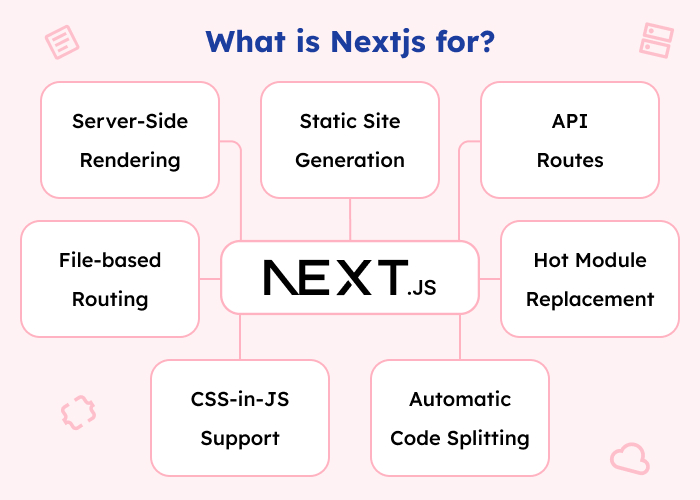
What is Nextjs for?

enterprise performance management software

As I explained above what is Nextjs framework, let’s understand what is Nextjs used for. Below are the use cases of Nextjs:

  • Server-Side Rendering: By rendering React components on the server side before delivering them to the client, Nextjs enables developers to enhance SEO and performance. Thus, it is beneficial for websites and web applications with a lot of content that needs quick page loads.
  • Static Site Generation: Furthermore, Nextjs can pre-render pages at build time, generating static HTML files for improved performance and SEO. This approach is ideal for websites with content that doesn’t change frequently, such as blogs or marketing sites.
  • File-based Routing: Next.js simplifies routing by allowing developers to create pages and routes based on the file system structure. Thus, the organization of code and the creation of intuitive URL structures becomes easier.
  • API Routes: Furthermore, Nextjs provides built-in support for creating API routes, allowing developers to define serverless API endpoints within their Next.js applications.
  • Automatic Code Splitting: Nextjs automatically splits code into smaller bundles, reducing initial page load times and improving performance.
  • CSS-in-JS Support: Nextjs supports various CSS-in-JS solutions out of the box, making it easy to style components using popular libraries like styled-components or CSS modules.
  • Hot Module Replacement: Nextjs supports HMR, allowing developers to see changes reflected in the browser in real time without losing the application state.

What is the difference between React and Nextjs?

React is also an open-source framework like Nextjs but, it is developed by Meta. React was first released in 2013. Thereafter, developers started using React to develop huge applications. 

On the other hand, Nextjs uses React and offers more functionalities and ease in the development of web applications. Let’s understand the difference between React and Next.js in detail.

Firstly, React is a JavaScript library for building UI & maintained by Facebook. Now, what is Nextjs? Next.js is a React framework for building SSR and static web applications developed by Vercel. The latest version released for React is 18.2.0 and for Next.js is v14.3.0-canary.21.

React provides a component-based architecture. Thus, it allows React developers to create reusable UI components that manage their own state. On the contrary, as mentioned before, Nextjs extends React. It provides a streamlined development experience and built-in features for web development.

To sum up, Nextjs is a framework that was developed on top of React and offers further capabilities and optimizations for creating server-side rendered and statically produced web apps. 

React is a JavaScript toolkit used to create UI. It may be used in isolation by developers to create client-side apps, or in conjunction with Next.js to make use of its built-in functionalities for server-side rendering, routing, and other web development tasks. You can go through the comparison in detail in our React vs Nextjs blog.

How to handle Nextjs ‘window is not defined’?

After knowing what is Nextjs & developing applications using Nextjs framework & React, it is typical to run across the issue ‘window is not defined’. When trying to execute the window object in a situation where it is unavailable, such as in Nodejs or while SSR, this error happens.

We may utilize the conditional rendering approach in React & Nextjs to tackle the ‘window is not defined’ problem. We may render particular components or run code based on conditions by using conditional rendering.

Just implement conditional rendering – (typeof window !== ‘undefined’) and handle the ‘window is not defined’ error.

Conclusion

In the conclusion of this blog ‘What is Nextjs’, Nextjs is a potent framework that expands on React’s capabilities in the dynamic world of web development. It provides simplified development and pre-built functionality for creating server-side rendered and statically produced web apps. 

Nextjs gives developers the tools they need to easily and quickly construct contemporary online apps. These tools include automated code splitting, built-in API routes, SSR and static site generation support, and more. 

Nextjs is a useful tool that helps us construct high-performance online experiences and realize the full potential of React as we work through the challenges of web development.

FAQs

Is Nextjs suitable for beginners in web development?

Yes, Next.js can be a great framework for beginners due to its intuitive API, built-in features, and extensive documentation. It simplifies many aspects of web development, allowing beginners to focus on learning React while still building powerful web applications.

Can Next.js be used for e-commerce websites?

Absolutely! Nextjs is well-suited for building e-commerce websites, offering features like server-side rendering and automatic code splitting that can improve performance and SEO. Many popular e-commerce platforms leverage Next.js for their front-end development.

Does Nextjs support internationalization out of the box?

While Nextjs itself doesn’t provide built-in support for internationalization, there are several community-supported libraries and packages available that integrate seamlessly with Next.js to add internationalization capabilities to your applications.

What are some popular companies using Next.js in production?

Many well-known companies and startups use Next.js in production, including Nike, Solos, Spotify, Nerdwallet, and more. Its versatility and performance make it a popular choice for building scalable and high-traffic web applications.

Is it possible to deploy Nextjs applications on platforms other than Vercel?

Yes, Nextjs apps can be deployed on various hosting platforms, including Vercel. Next.js provides flexibility in deployment options, allowing developers to choose the platform that best suits their needs and preferences.

The post What is Nextjs? appeared first on Alian Software.

]]>
Hire Shopify Partners through the Shopify Partner Directory https://staging.aliansoftware.net/project-management/hire-shopify-partners-through-the-shopify-partner-directory/ Sun, 12 May 2024 15:30:06 +0000 https://aliansoftware.com/?p=45764 Having a fantastic product or service is not enough to unlock the full potential of your Shopify business. You also need to have good design, and developed store and marketing strategies. Shopify Partners can help with that. These specialists are essential to taking your store to new heights since they are trained professionals. In this blog post, we will look into the details of Shopify experts and how to find an experienced partner in the Shopify Partner Directory.

The post Hire Shopify Partners through the Shopify Partner Directory appeared first on Alian Software.

]]>

What is a Shopify Partner Directory?

enterprise performance management software

A carefully selected list of Shopify is available in the Shopify partner directory. Shopify store owners may look through partners’ offerings and services they provide through this directory. Thereafter, they can contact the partners to begin the process of development, designing, marketing, and so on. 

Furthermore, there are multiple ways from which Shopify merchants can select the right partner for their job from the directory. They can search for their favorite or preferred partner or can apply various filters to find one as per the requirement. 

Additionally, trust-delivered projects and caliber of work are the basic criteria used by the Partner Directory to rate Partners. Factors that promote trust, performance, quality of work, recommendations, cooperation, active engagement, Shopify certifications, and excellent experiences for traders are given priority by the listing algorithm.

How to search for Shopify experts in a Shopify Partner Directory of Shopify?

Firstly, the Shopify store owners can search for a Shopify expert they know. Just search the name and you will get the information of the Shopify expert in detail. Furthermore, Shopify merchants may also explore Shopify experts by their service and filter them based on the data gathered from their profiles. 

Shopify merchants can contact Shopify experts using the Partner Directory lead form after viewing their profile. Using the form, the merchant may offer their contact details as well as basic details regarding the task that requires assistance, such as the shop, the necessary service, the cost, and an explanation of the issue or aim. 

Thus, this lead form is delivered to the email address listed on the Partner Directory profile. Shopify experts may contact the Shopify merchants directly using the data provided in the lead form.

Are you thinking about genuine reviews? Then, the reviews that you can see in the profile of Shopify experts in the directory are genuine. Shopify owners get the request to write a review in the profile of Shopify partners after completing the task. 

Additionally, this can only be done if the Shopify merchant contacts the Shopify expert through the Shopify directory, the partner sends the request & the merchant accepts it, and for two weeks collaborator access is enabled. Furthermore, merchants cannot submit reviews until they have received a review request.

If the work is still underway, you can request that the merchant submit their evaluation at the end of your partnership. Only qualifying merchants on a paid plan will have their reviews published.

What to look for while hiring Shopify partners from the Shopify directory?

When hiring Shopify experts from the Shopify directory, it’s essential to consider several factors to ensure you find the right fit for your project or business needs. Here are some key things to look for:

  • Experience and Expertise: Review the expert’s profile to assess their experience with Shopify. Furthermore, look for experts who have a track record of successfully completing similar projects or have relevant certifications and qualifications.
  • Portfolio and Case Studies: Evaluate the expert’s portfolio and case studies to see examples of their past work. This can give you insight into their design style, technical capabilities, and the types of projects they have worked on.
  • Reviews and Ratings: Check the expert’s reviews and ratings from previous clients. Look for feedback on their communication, professionalism, expertise, and the quality of their work.
  • Specializations: Consider whether the expert has specific specializations or areas of expertise that align with your project requirements. For example, if you need help with Shopify app development or theme customization, look for experts with relevant skills and experience in those areas.
  • Communication and Availability: Communication is key to a successful collaboration. Ensure that the expert is responsive to inquiries and communicates clearly and effectively. Additionally, consider their availability and timezone compatibility to facilitate smooth communication throughout the project.
  • Cost and Budget: Determine your budget for the project and inquire about the expert’s rates and pricing structure. While cost is important, prioritize value and quality over the lowest price to ensure you receive high-quality work that meets your needs.
  • Support and Maintenance: Inquire about the expert’s post-launch support and maintenance services. Furthermore, ensure they offer ongoing support, updates, and troubleshooting assistance to address any issues that may arise after the project is completed.

Conclusion

For Shopify shop owners, looking for help with development, design, marketing, and other areas of the business, Shopify Partner Directory is a valuable resource. Businesses can locate Shopify partners who can assist them in optimizing their stores. 

By utilizing the Partner Directory’s search and filtering features, as well as authentic evaluations and ratings, businesses can make well-informed hiring selections for Shopify partners. 

Thus, businesses may discover the ideal partner to grow their Shopify business and realize its full potential by taking into account variables like experience, portfolio, communication, and budget.

FAQs

Can I trust the reviews and ratings of Shopify partners on the Shopify Directory?

Yes, the reviews and ratings on the Shopify Directory are genuine and provided by Shopify merchants who have worked with the experts. Merchants are prompted to write reviews after completing a project with a partner, ensuring authenticity and transparency in the feedback process.

How do I ensure that the Shopify expert I hire from the directory is qualified for my project?

To ensure the Shopify expert is qualified for your project, carefully review their profile to assess their experience, expertise, and portfolio. Look for relevant certifications, case studies, and past projects similar to yours. Additionally, consider reaching out to the expert directly to discuss your project requirements and gauge their understanding and suitability.

What if I encounter issues with the Shopify expert I hire from the directory?

If you encounter issues with the Shopify partner you hire from the directory, communicate your concerns openly and promptly with the expert. Discuss any discrepancies or problems you encounter and work together to find solutions. If necessary, you can escalate the issue to Shopify’s support team for assistance and resolution.

The post Hire Shopify Partners through the Shopify Partner Directory appeared first on Alian Software.

]]>
Best employee time tracking app available in the market https://staging.aliansoftware.net/project-management/best-employee-time-tracking-app-available-in-the-market/ Sat, 11 May 2024 15:30:13 +0000 https://aliansoftware.com/?p=45782 Effective time management is essential to productivity in any kind of organization. Whether you run a business managing staff or are a freelancer managing several projects, an accurate time tracking app is crucial for productivity, accurate invoicing, and performance reviews. Thankfully, a multitude of technologies have emerged in the digital era to help automate employee time tracking.

Some of the most notable cloud based time tracking software among them include extensive functionality, intuitive user interfaces, and device compatibility. We will explore the list of employee time tracking applications in this blog post to find the top options currently in the market. We will examine the finest options that enable both people and businesses to make the most of their time. From sophisticated capabilities like real-time time tracking, and project management integration to cost and ease of use, let’s get started.

The post Best employee time tracking app available in the market appeared first on Alian Software.

]]>

What is a time tracking app?

A time tracking app is a software application designed to help individuals or organizations monitor and manage the time spent on various tasks, projects, or activities.

Thus, with these applications, users or employees can usually keep track of and log the amount of time they spend on various projects or activities throughout the day. These applications are mostly cloud based time tracking software.

Some time tracking apps integrate with other productivity tools. For instance, in project management software, calendars, or invoicing systems, streamlining workload and reducing manual data entry.

On the other hand, some come as in-built applications in the project management software. For freelancers or businesses that bill clients based on hours worked, time tracking apps include features for generating invoices based on tracked time.

Features of an employee time tracking app

enterprise performance management software

In order to successfully monitor and manage workers’ work hours, the best time tracker app usually includes a number of features. The following are some typical features of time tracking software: 

  • Start & Stop: Enables workers to record the beginning and ending times of their shifts or workdays in the time tracker apps.
  • Timesheets: Gives access to a digital log of each employee’s hours worked during a given time frame such as daily, weekly, or monthly.
  • User Action Monitoring: The best time tracking app must be able to monitor the keyboard keystrokes and the mouse usage counts of every employee.
  • Work Screenshots: The best time tracker app should have the feature of capturing screenshots of the work done by the employees at regular intervals of time.
  • Manual Time Entry: Give workers the option to manually log their working hours in the event that they forget to start the time tracker app or need to make any changes. 
  • Project and Task Tracking: Furthermore, this feature gives workers the option to track their time in certain activities or projects.
  • Overtime Calculation: Additionally, it automatically calculates overtime hours based on predefined rules and regulations, such as overtime eligibility and rates.
  • Reporting and Analytics: Generate reports on employee productivity, and time utilization, and provide insights for performance evaluation and resource allocation.
  • Notifications and Alerts: Furthermore, the time tracker app should send reminders to employees to clock in/out, and alert managers of any discrepancies or unusual activities.
  • User Roles and Permissions: The app should define different user roles. For instance, employees, managers, and administrators with varying levels of access and permissions to the app’s features and data.

Benefits of time tracker apps

Time tracking software provides a number of advantages to both people and businesses:

  • Improved Productivity: Individuals may determine where their time is being used more efficiently and make modifications to maximize productivity. Thus, the best time tracker app is useful to measure the amount of time spent on various tasks and projects.
  • Better Time Management: The best time tracking app assists users in setting priorities and managing their time more effectively. Thus, it lowers delay and guarantees that deadlines are reached.
  • Accurate Billing and Invoicing: Time tracker apps assist in maintaining fair and transparent billing procedures. This is because they provide accurate records of billable hours to freelancers and businesses.
  • Insights into Time Usage: Furthermore, time tracker apps generate reports and analytics. They provide insights into how time is being spent, allowing individuals and organizations to identify time-wasting activities and areas for improvement.
  • Project Management: Project managers may efficiently allocate resources, evaluate progress, and make educated choices. Thus, they ensure projects remain on schedule by keeping track of the amount of time spent on various activities and projects.
  • Client Transparency: Time tracking software helps service-based organizations build trust and responsibility by giving clients access to comprehensive information on project time spent.
  • Remote Work Monitoring: With the rise of remote work, time tracker apps help employers monitor remote employees’ productivity and ensure they are working efficiently and effectively.
  • Resource Allocation: Organizations can use the data of app for employee time tracking to allocate resources more effectively. Thus, they can identify areas of high demand and reallocate manpower or resources accordingly.

What is the best employee time tracking app?

Here is a list of some of the best time-tracking software options that businesses may employ at a reasonable price after reviewing some of the top options.

  • Alian Hub

    An all-in-one program for managing projects and time is Alian Hub. Employees can track the time of various tasks easily with Alian Hub’s built-in free time tracking app.

    You have two options for tracking time: manually enter time or start a timer. In addition, it captures screenshots of the active window in various time intervals. Furthermore, every user action is tracked. For example, keystrokes and mouse usage count.

    The time report contains each user’s weekly or monthly time statistics. Timesheets can be generated, projects and tasks work time may be scheduled, and workload can be managed automatically. Both large and small businesses may effectively measure employee work hours using its best free time tracking app.

    Furthermore, it offers functions including file sharing, kanban, milestone reporting, real-time voice chat, and more. Therefore, it’s also helpful for assessing the advancement of employees. Finally, it is inexpensive and simple to use, best time tracker app.

  • Timely

    The most effective time tracking app strives to make the process of accurately recording your time spent as simple as possible. An automatic time tracker, Timely is the most accurate and painless option available.

    If you work in a company, a tool like this may appear unsettling—but Timely is not an employee time tracking software. You are the sole owner of the data it gathers. Furthermore, you control how much of this information you choose to disclose on your timesheet.

  • Toggl Track

    Toggl Track is a good choice if you need a time tracker app but lack the funds to purchase one. All of the essential features of a cloud based time tracking software are included in this time tracking software’s extensive fee which grants you exposure to all of its apps.

    The main reason Toggl Track functions so well is that it doesn’t need much of you after you begin timing tasks. A customer, project, and task must be added to your account in order for many time tracking software to allow you to monitor time. However, if not, you will need to input them and put your task on hold for now. You may monitor your time immediately using the Toggl monitor. Examine your recorded time entries in a calendar or grid style, and worry about the specifics later.

  • HourStack

    It is a time tracker that works well with your preferred project management software to assist your team in scheduling and monitoring work. You can say that it is a simple and elegant time tracker and calendar combo.

    The software is in many well-known project management applications, including Google Calendar, Asana, Trello, etc. It has a simple drag-and-drop feature for workload scheduling of teams.

  • RescueTime

    RescueTime is an automated time tracking app that places emphasis on awareness, in-depth work, and minimizing interruptions throughout your working hours.

    Installing a little monitoring tool on your system is the first step towards utilizing RescueTime’s ‘Focus’ version, which is, in my opinion, significantly superior. Furthermore, it could notify you, for instance, if you’re juggling multiple tasks more than usual or are distracted.

Conclusion

In conclusion, effective time management is crucial for individuals and businesses alike. What is the best employee time tracking app? Alian Hub which offers a range of benefits, including improved productivity, better time management, insights into time usage, and streamlined project management is the best employee time tracking software. 

With the abundance of options available in the market, choosing the right time tracking app can greatly enhance efficiency and productivity. From comprehensive features to user-friendly interfaces, the top time tracking apps empower users to make the most of their time and achieve their goals.

FAQs

Does Microsoft have a time tracking app?

Yes. Timeclock 365 is the time tracking app of Microsoft.

Can time tracking apps guarantee 100% accuracy in tracking work hours?

Yes. Time tracking apps provide valuable insights into time usage. However, their accuracy may vary depending on factors such as user diligence in logging time and the reliability of the app’s tracking mechanisms. However, they offer a reliable means of monitoring and managing work hours for most users.

Are time tracking apps suitable for all types of businesses and industries?

Time tracking software can be beneficial for a wide range of businesses and industries, including freelancers, small businesses, remote teams, and large corporations. However, their suitability may depend on factors such as industry regulations, company culture, and specific workflow requirements.

How can employers ensure employee privacy while using time tracking apps?

Employers should prioritize transparency and communication when implementing time tracking software to address concerns about employee privacy. Clearly defined guidelines for the usage of tracking data. Furthermore, employees should understand the purpose and limitations of time tracking. Additionally, opting for apps with privacy features such as user-controlled data visibility can help mitigate privacy concerns.

What are some common challenges associated with implementing time tracking apps in organizations?

Some common challenges include resistance from employees who perceive time tracking as intrusive. Difficulty in integrating time tracking apps with existing systems and workflows, and ensuring consistent and accurate usage across the organization.

The post Best employee time tracking app available in the market appeared first on Alian Software.

]]>
Which is the best React testing library? https://staging.aliansoftware.net/project-management/react-testing-library/ Thu, 09 May 2024 15:30:13 +0000 https://aliansoftware.com/?p=46133 Testing React applications is essential for identifying bugs and maintaining code quality. Selecting the best React testing library might be challenging given the abundance of tools and libraries available. Thus, this blog will help in choosing the library that best fits the needs of your project. However, it might be difficult because each one has its own features, methods, and approaches. Let’s explore the React test library in detail.

The post Which is the best React testing library? appeared first on Alian Software.

]]>

How do you choose the best React testing library?

react testing library

The needs of your project, the experience of the QA team, objectives, and personal preferences all play a role in selecting the best React testing library. Here is a step-by-step method to assist you in making decisions:

  • Set goals and objectives for your testing first. Choose the components, that you wish to test in your React application.
  • Examine the particular needs of your project, taking into account its scope, technology stack, and scale. Furthermore, take into account aspects like scalability, and interoperability with other tools and libraries in your project.
  • Examine the different React testing libraries that the community has to offer. Moreover, think of more recent options that could provide special features or benefits, as well as well-known options like Cypress and Jest.
  • Evaluate each testing library’s features and capabilities with regard to your project’s needs and testing objectives. Consider elements like ease of use of the API, the caliber of the documentation, community support, and compatibility with other testing tools.
  • Furthermore, choose a testing library that aligns with your preferred approach and provides adequate support for your testing strategy.
  • Seek feedback from peers, colleagues, and online communities with React testing experience.
  • Remember that choosing a testing library is not a one-time decision. Thus, as your project evolves and your testing needs change, be open to revisiting your library choice and adapting your testing strategy accordingly.

Best testing library for React

Below is the list of the top 5 testing libraries for React.

Jest React testing library

The most widely used testing library for React created and administered by Facebook is called Jest. Uber and other companies have embraced and used it to test React components. 

The React Community strongly advises using Jest as their preferred React testing framework. It has a test runner of its own.

The major benefit of Jest testing is that it is open-source and supports parallel testing. Furthermore, it offers live snapshots and is compatible with Vuejs, AngluarJs, etc.

Jasmine

Testing many types of JavaScript apps may be done with Jasmine, an excellent free BDD testing framework. It also has its own test runner. Furthermore, it looks at how responsive and readable the user interface is on a variety of screen sizes. 

Mostly, this React testing library is used together with Enzyme and Babel. Testers use Jasmine when they need to test large projects. The major benefit is that it is easy to learn and user-friendly.

Karma

Karma is a Node.js-based JavaScript test runner. It develops an HTML file for the test runner and creates an HTTP server. 

It was designed to make the feedback loop between creating code and obtaining data from tests as simple as possible. It enables one to run JavaScript code across several actual browsers. 

Because of its connection with well-known continuous integration tools like Jenkins and Travis, test-driven development is made quick, enjoyable, and simple.

Enzyme

Enzyme is a React testing library intended to make it easier for developers to test the React components. It is among the most popular frameworks that Airbnb has created. 

To test the React component, it is simply integrated with different frameworks like Jest React testing library, Mocha, etc. The enzyme is utilized for object access, component rendering, element discovery, element interaction, and event simulation. 

Cypress IO

Writing tests without the need for extra testing frameworks is made possible by Cypress, an incredibly quick end-to-end React testing library. It makes it possible to conduct tests using command lines or actual browsers. 

In addition to evaluating the code in an actual browser, browser development tools may be used simultaneously. It has a control panel that allows you total control over the state of every test.

Conclusion

Selecting the appropriate React testing library is essential to guaranteeing the dependability and steadiness of your apps. There isn’t a single best alternative for every situation. Thus, taking into account variables including project requirements, community support, and individual preferences may help you identify the best choice.

Whichever library you choose—the feature-rich Jest, the straightforward Jasmine, the adaptable Karma, the user-friendly Enzyme, or the smooth end-to-end testing of Cypress—each one has certain advantages that can improve your testing.

To keep ahead in the rapidly expanding field of React development, never stop trying new things, getting feedback, and refining your testing approach.

FAQs

What makes Jest the preferred choice for React testing?

Jest is favored for its comprehensive features, including parallel testing, live snapshots, and compatibility with various frameworks. Its association with Facebook and widespread adoption by companies like Uber add to its credibility.

How does Enzyme simplify React component testing?

Enzyme, developed by Airbnb, streamlines React component testing by providing intuitive methods for object access, component rendering, element discovery, interaction, and event simulation. Its integration with Jest and other frameworks enhances its usability.

Why is Cypress IO known for its speed in end-to-end testing?

Cypress IO stands out for its rapid end-to-end testing capabilities, allowing tests to be conducted using either command lines or actual browsers. Its simultaneous evaluation of code in real browsers, coupled with browser development tools, ensures efficient and thorough testing.

What sets Karma apart from other test runners?

Karma distinguishes itself with its seamless integration with popular continuous integration tools like Jenkins and Travis, making test-driven development quick, enjoyable, and straightforward. It simplifies the feedback loop between code creation and test results.

How does Jasmine contribute to Behavior-Driven Development (BDD) in React testing?

Jasmine excels in BDD testing for various JavaScript applications, including React, by offering an intuitive syntax and its own test runner. It emphasizes readability and responsiveness across different screen sizes, making it suitable for testing large projects.

The post Which is the best React testing library? appeared first on Alian Software.

]]>